Project 3 · CS180 · Fall 2026
Exploring the Power
of Flow Models
In Part A I used a pretrained text-to-image flow model, PixNerd, to denoise images, generate new ones from noise, edit photos and drawings, and make optical illusions. In Part B I trained my own flow matching model from scratch to generate handwritten digits.
Part A · 1.1
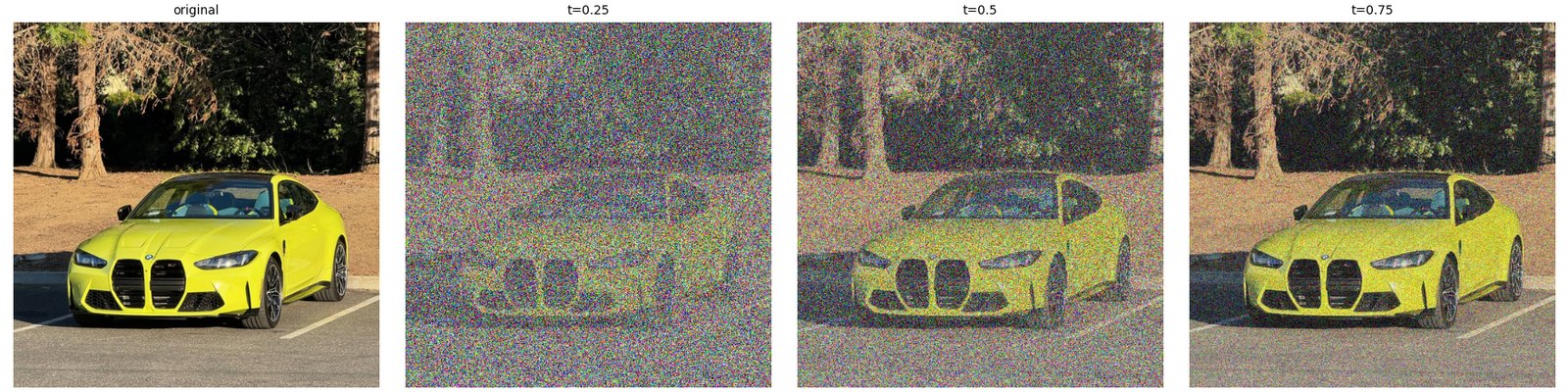
Constructing noisy training inputs
Flow matching connects noise and images with a straight line: xt = (1 − t)·ε + t·x1, where ε is Gaussian noise and x1 is the clean image. At t = 0 it's pure noise and at t = 1 it's the clean image. So this is more than adding noise on top. The image also gets scaled down by t, and the noise fills in the rest.
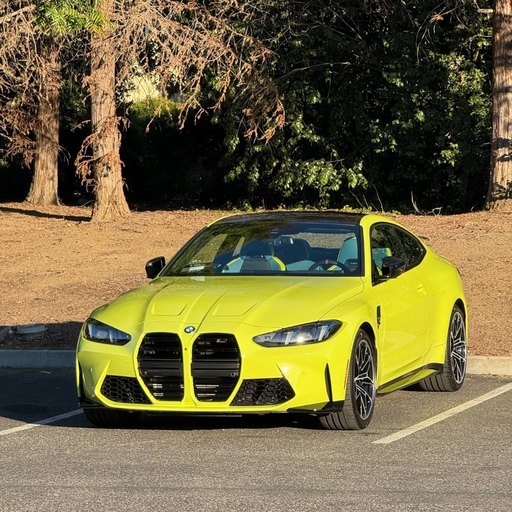
For my image I used a photo I took of a yellow BMW M4 I saw in a parking lot, cropped to 512×512. I sampled one noise tensor and reused it for all three times, so the only thing changing between them is t.
Part A · 1.2
Classical denoising
Before using the model, a baseline with no learning at all. At time t the image only has strength t, so I divide by t to bring it back to full brightness, then blur it with a Gaussian to average the noise away. I tried σ = 1, 2, 4, 8 and 16 and kept whichever came out closest to the original.
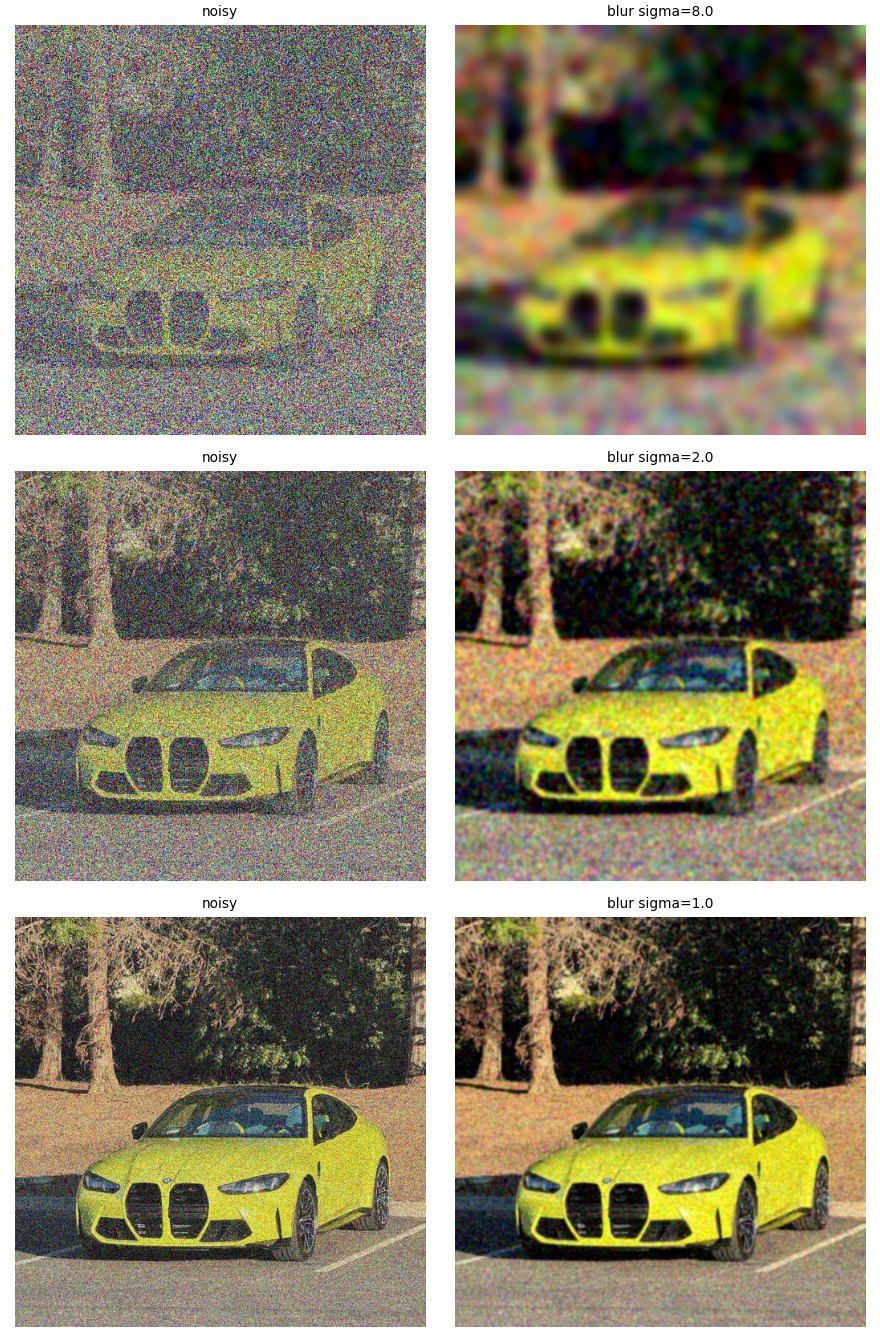
At t = 0.25 the best blur was σ = 8, which wipes out basically all the detail. You can tell there's a yellow car and some trees, and that's about it. At t = 0.5 and 0.75 a small blur (σ = 2 and 1) was best, and lots of speckle is left over. Blur can't tell noise apart from detail. Both are high frequency, so removing one removes the other.
Part A · 1.3
One-step denoising
The model predicts a velocity, which is the direction from noise toward the image. Since every training path is a straight line, I can follow the predicted direction all the way to t = 1 in one jump: x̂1 = xt + (1 − t)·v̂. The prompt is "a high quality photo".
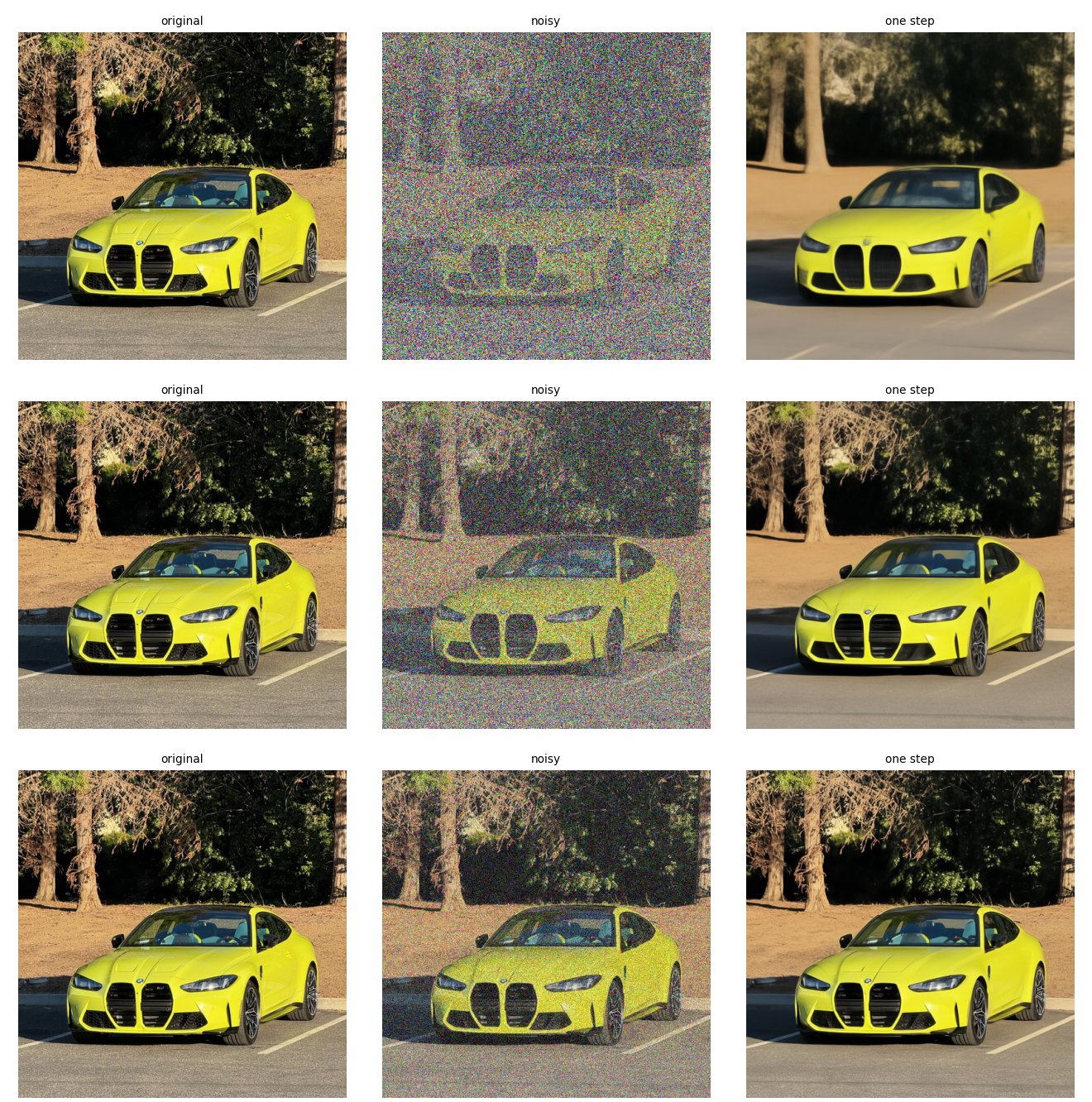
This is way better than blur at every noise level. Even at t = 0.25, where the input is mostly noise, it gets the car's shape and color and the trees behind it. What it can't get is fine detail. The grille, the wheels and the leaves come out soft and smoothed over, because one jump has to average over every image that could have produced that noise.
Part A · 1.4
Visualizing velocity
Here I compare what the model adds, (1 − t)·v̂, with what it should add to get my exact original back, x1 − xt. Both updates use one shared color scale where middle gray is zero. The heatmap is the per-pixel RMS error across RGB, with one scale for all three times. A few extreme pixels made everything else look black, so I set the limits at the 99.5th percentile for the updates and the 99th for the error.
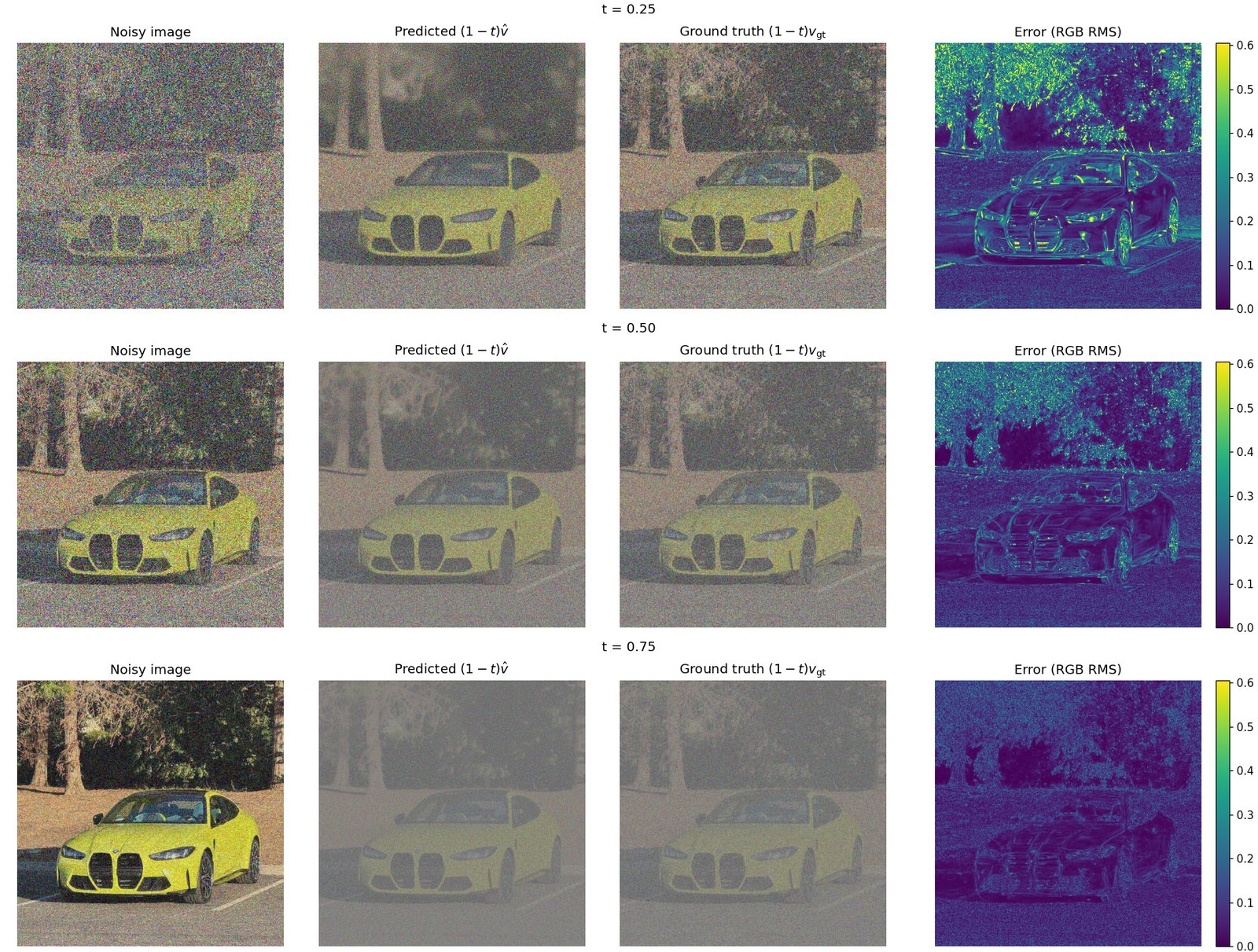
Almost all of the error sits on the tree leaves and the edges of the car. The road and the car's flat yellow panels are nearly perfect. That makes sense: big smooth areas survive the noise, but leaf texture and sharp edges get wiped out, so the model has to guess them. The error also shrinks as t goes up, from an average of 0.154 at t = 0.25 to 0.112 at 0.5 and 0.074 at 0.75, since there's less noise left to undo.
Part A · 1.5
Iterative denoising with Euler sampling
One jump assumes the velocity stays the same the whole way, but it doesn't. It changes as the image changes. So instead I take small steps of h = 0.02 and recompute the velocity every time: x ← x + h·v(x, t). Starting from t = 0.5 that's 25 steps. I count the number of steps up front and shorten the last one so it lands exactly on t = 1. Counting first also stops floating point error from adding an extra tiny step at the end.
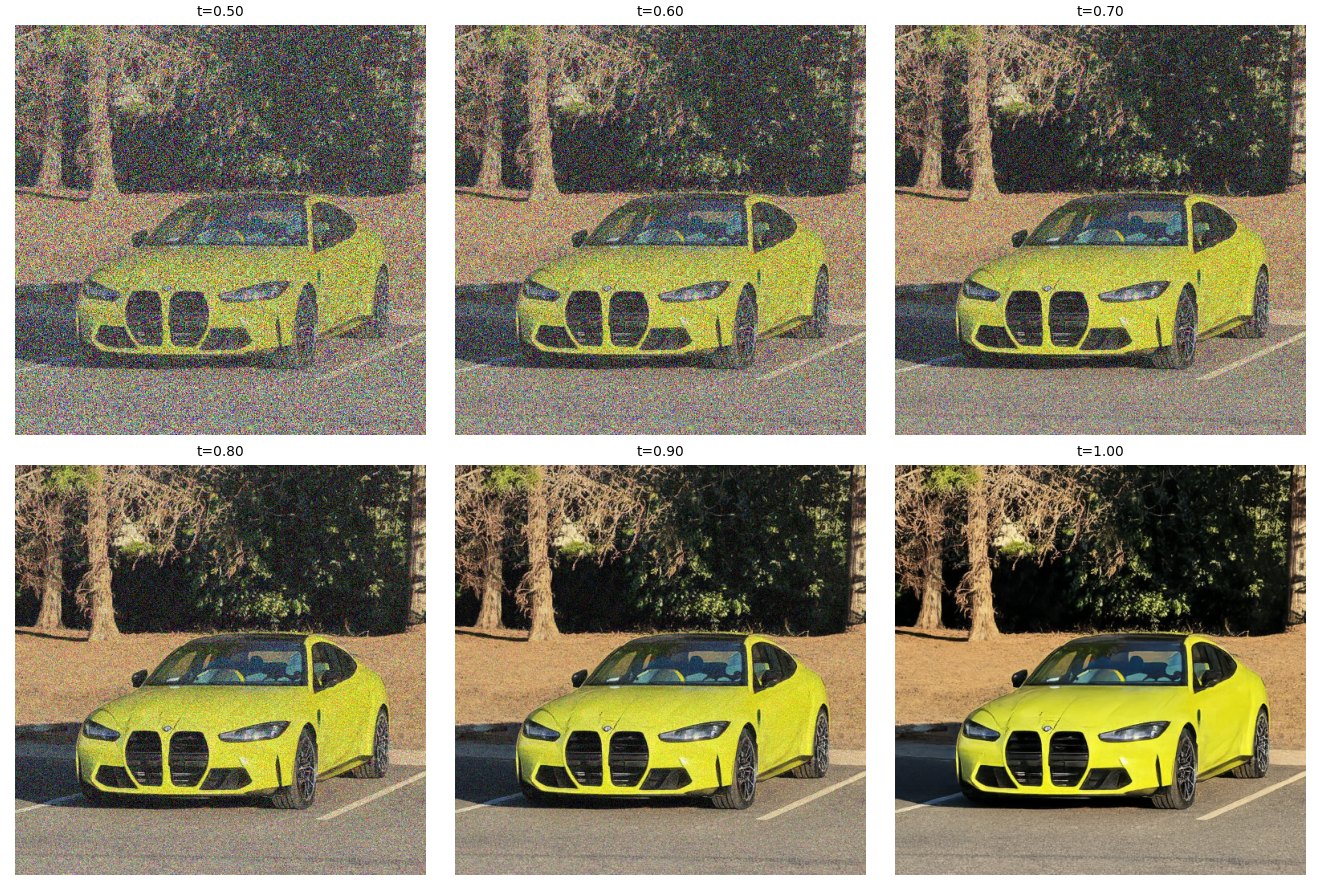
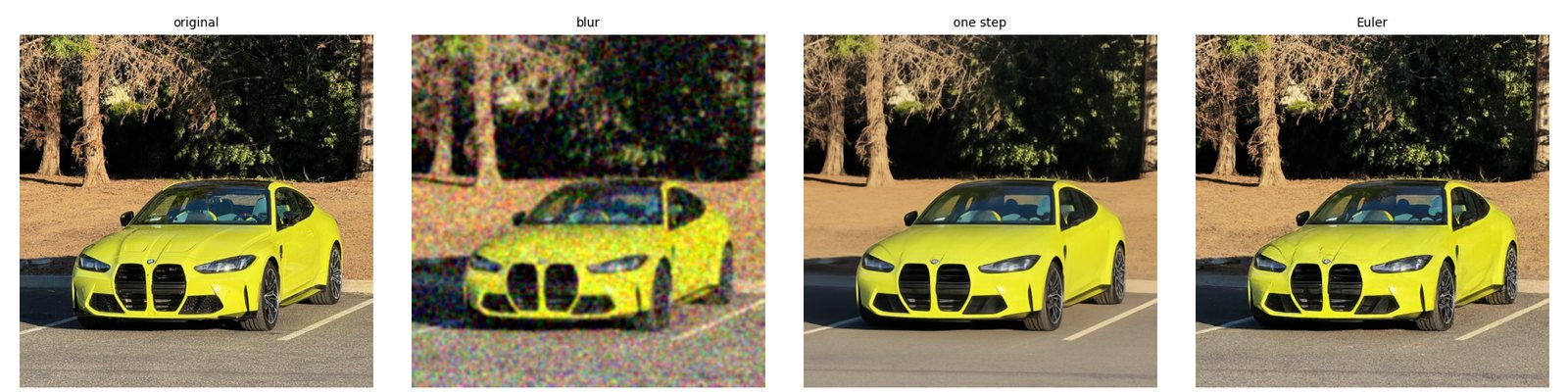
The Euler result is the sharpest of the three, with real texture back in the trees and the road. The funny part is that its pixel error is a bit worse than one-step: mean squared error 0.031 for Euler, 0.025 for one-step and 0.054 for blur. One-step averages over everything the noise could have hidden, and an average is blurry but scores well on pixel error. Euler commits to one specific sharp image, and since some of the detail it invents isn't exactly what was in my photo, it pays for that in the error. To my eye it's clearly the best one.
Part A · 1.6
Generating images from noise
Starting from pure noise at t = 0 turns the same sampler into an image generator. Each image is 50 Euler steps with the prompt "a high quality photo", using seeds 180 to 184.
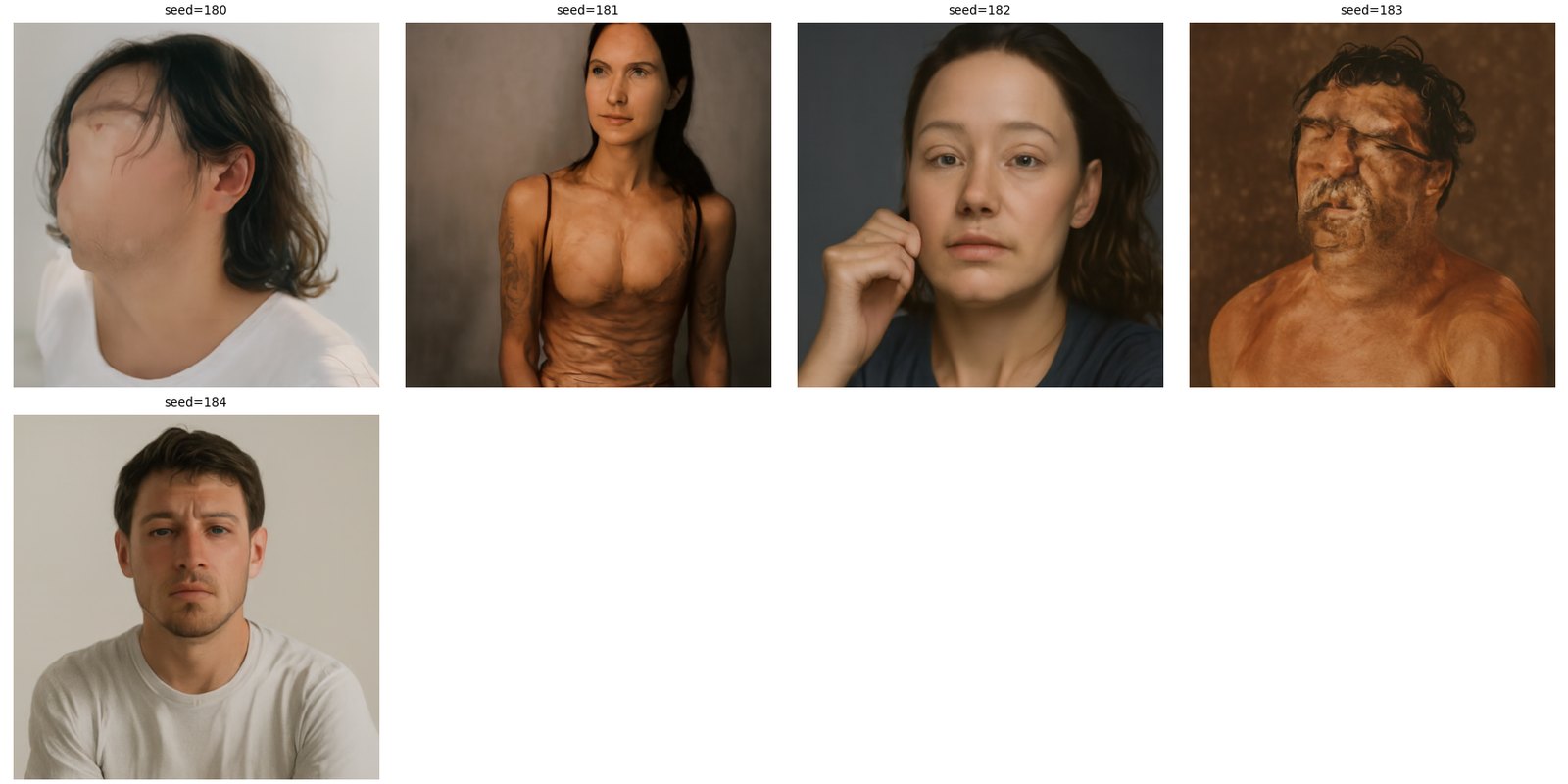
All five came out as portraits of people. Apparently "a high quality photo" means a headshot to this model. They also aren't very good. Seed 180's face is smeared out and seed 183's looks melted. The model knows roughly what to make, but nothing is pushing it to make a clean version.
Part A · 2.1
Classifier-free guidance
Classifier-free guidance runs the model twice per step, once with my prompt and once with an empty prompt. The difference between the two is the part of the velocity that comes from the prompt, and guidance pushes further in that direction: v = vcond + w·(vcond − vuncond), with w = 7. At w = 0 it's the same as no guidance, and I checked that it matches the plain prediction exactly.
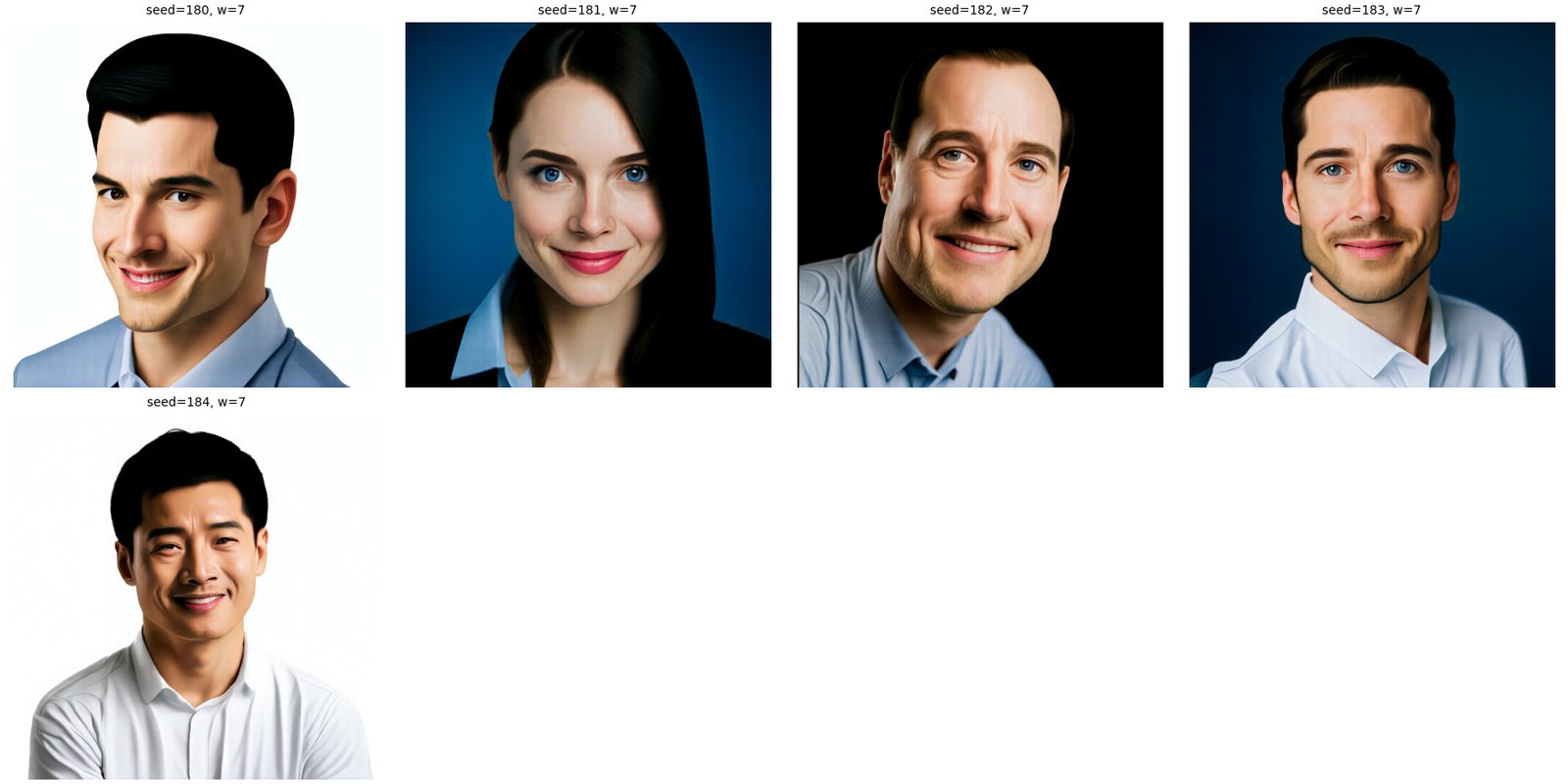
Same five starting noises, very different results. Every face is now clean and sharp, but they all look like the same stock photo: centered, smiling, plain background, collared shirt. Guidance trades variety for quality and for matching the prompt. It also costs two predictions per step instead of one, so it's twice as slow.
Part A · 3.1
Image-to-image editing
This is SDEdit. I add noise to a real image up to a starting time, then run the guided sampler from there to t = 1. A low starting time means the image is mostly noise and the model has to invent almost everything. A high one keeps most of the original. Every run here uses the prompt "a high quality photo", w = 7 and h = 0.02, with the seven starting times 0.02, 0.04, 0.06, 0.10, 0.14, 0.25 and 0.50.
The Campanile
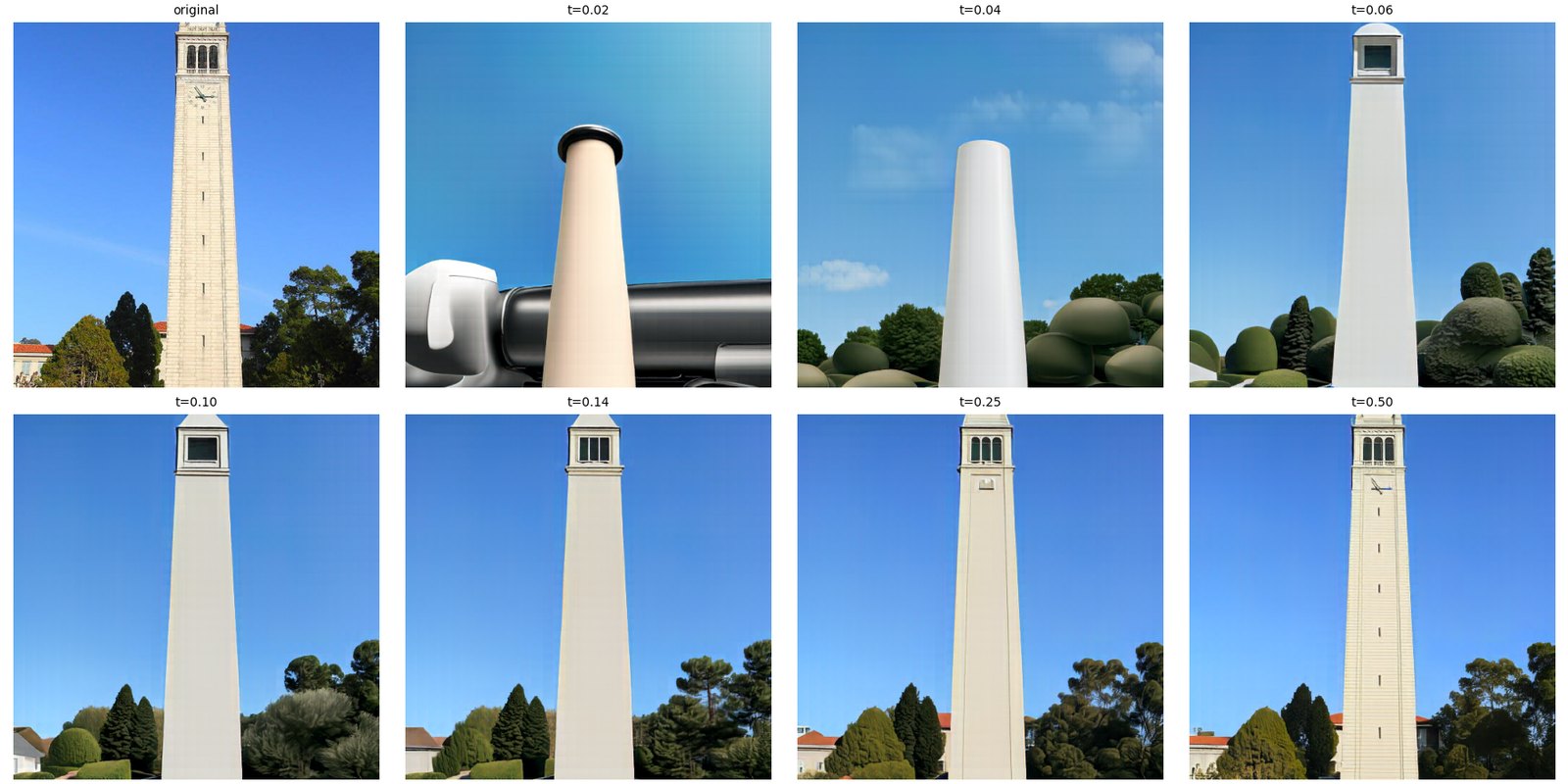
At 0.02 all that survives is a pale vertical shape against blue sky. The tower's taper is there by 0.06, the openings at the top by 0.14, and the clock face only comes back at 0.50.
A car in a parking lot
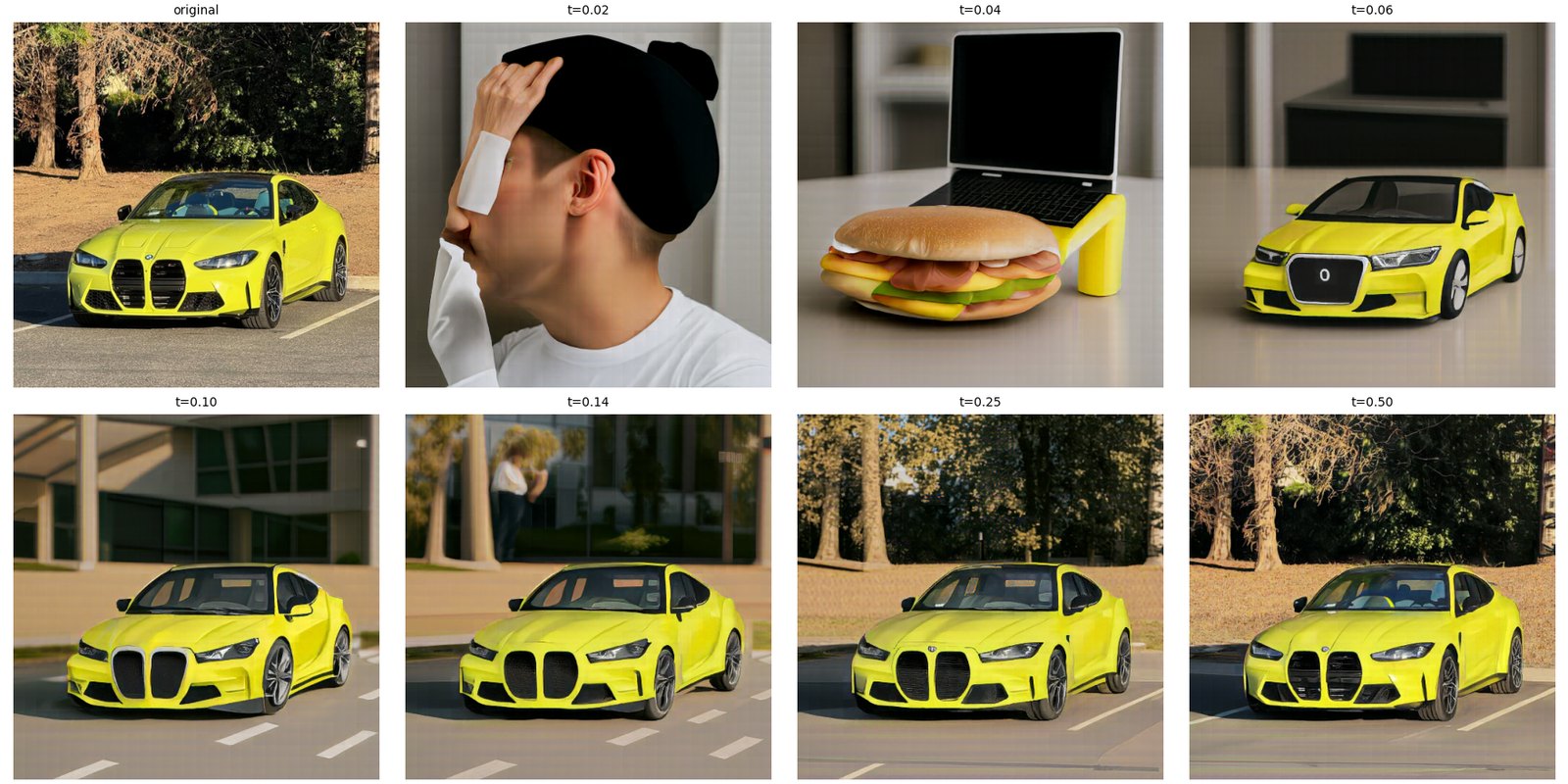
At 0.02 and 0.04 the car is gone completely, and I get a guy in a beanie and then a sandwich next to a laptop. Only the yellow survives, as the cheese and the laptop stand. At 0.06 there's a yellow toy-looking car on a table, at 0.10 and 0.14 a yellow sports car somewhere else, and from 0.25 on it's the M4 again with the same trees and parking lines.
My desk
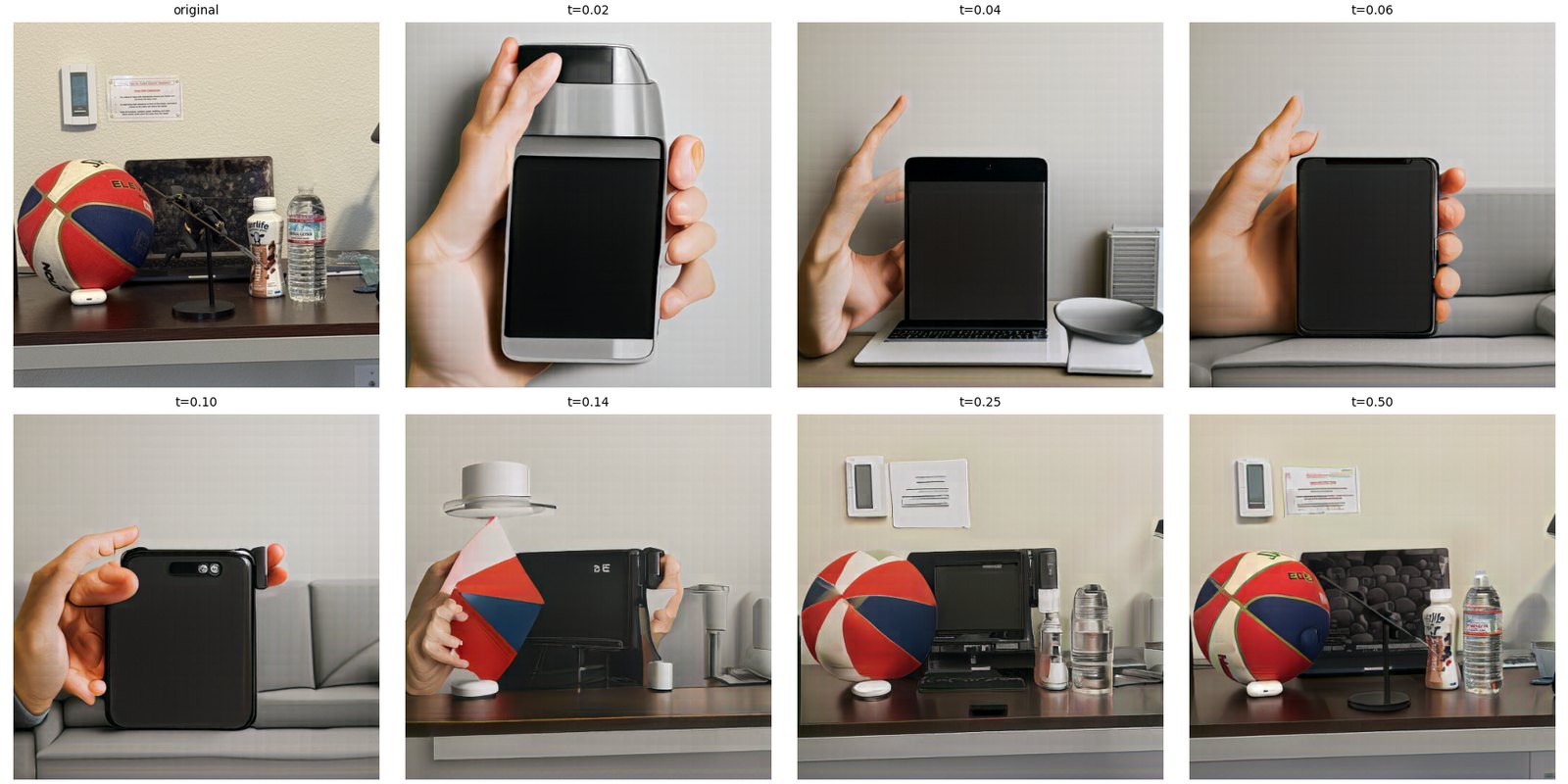
My desk turns into a hand holding a phone for the first few starting times. I think the model reads the dark laptop screen in the middle as a phone. The basketball comes back around 0.14 and the whole desk by 0.25.
A web image
This works especially well on images that aren't photos, since the model tries to pull them onto the space of real photos. For a web image I used Van Gogh's The Starry Night (public domain, from Wikimedia Commons).
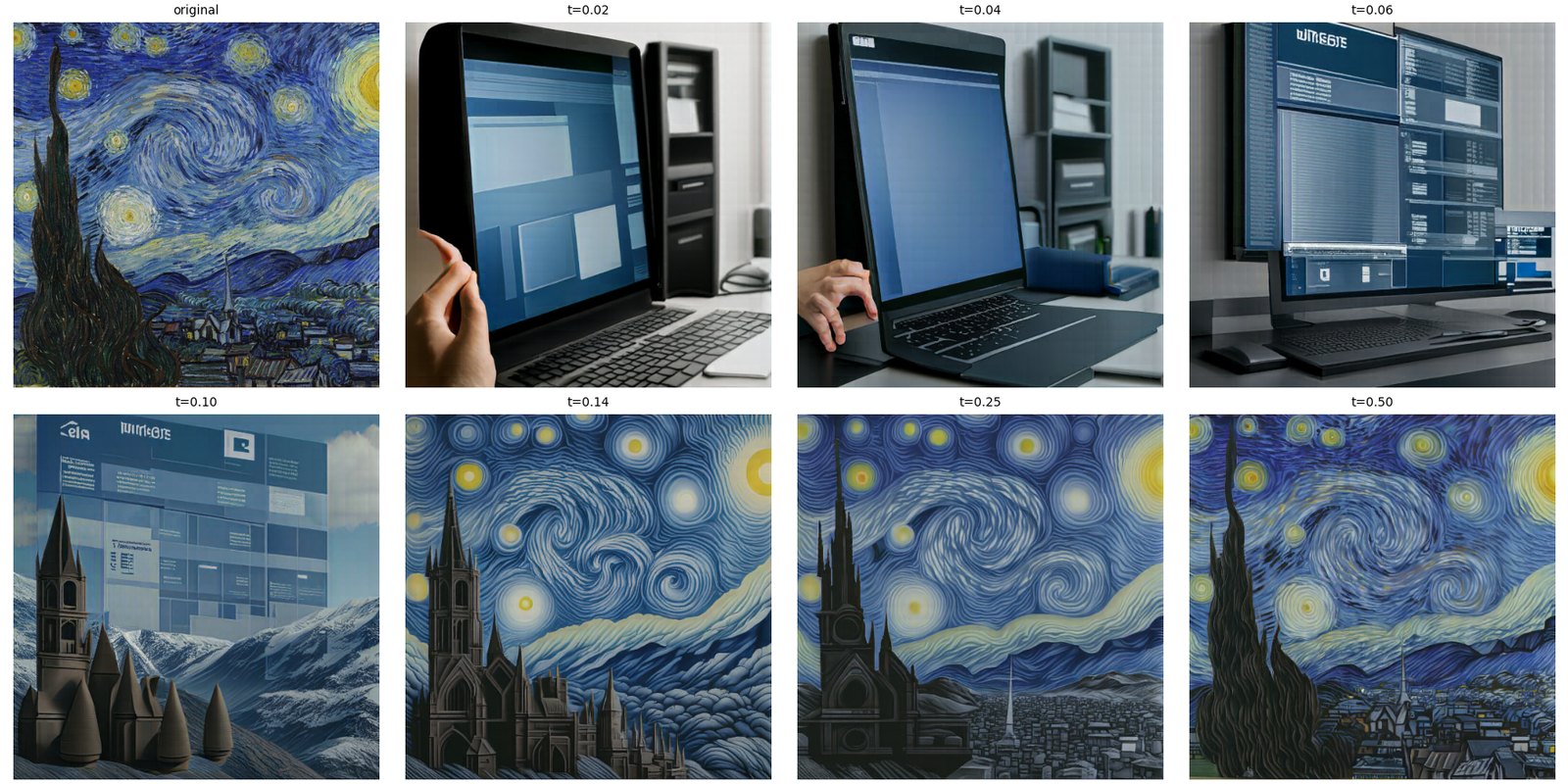
At the low starting times the model can't keep any of the painting and makes computer monitors instead, though it keeps the blue color scheme. At 0.10 there's a castle in front of snowy mountains. From 0.14 on there's enough of the painting left that it stays a painting, and the cypress tree turns into a gothic cathedral spire. So "make it real" only had a narrow window here, and with this painting it never fully got there.
My drawings
I also drew two things myself: a house and a car. They're thin black lines on white, which turns out to give the model very little to hold on to.
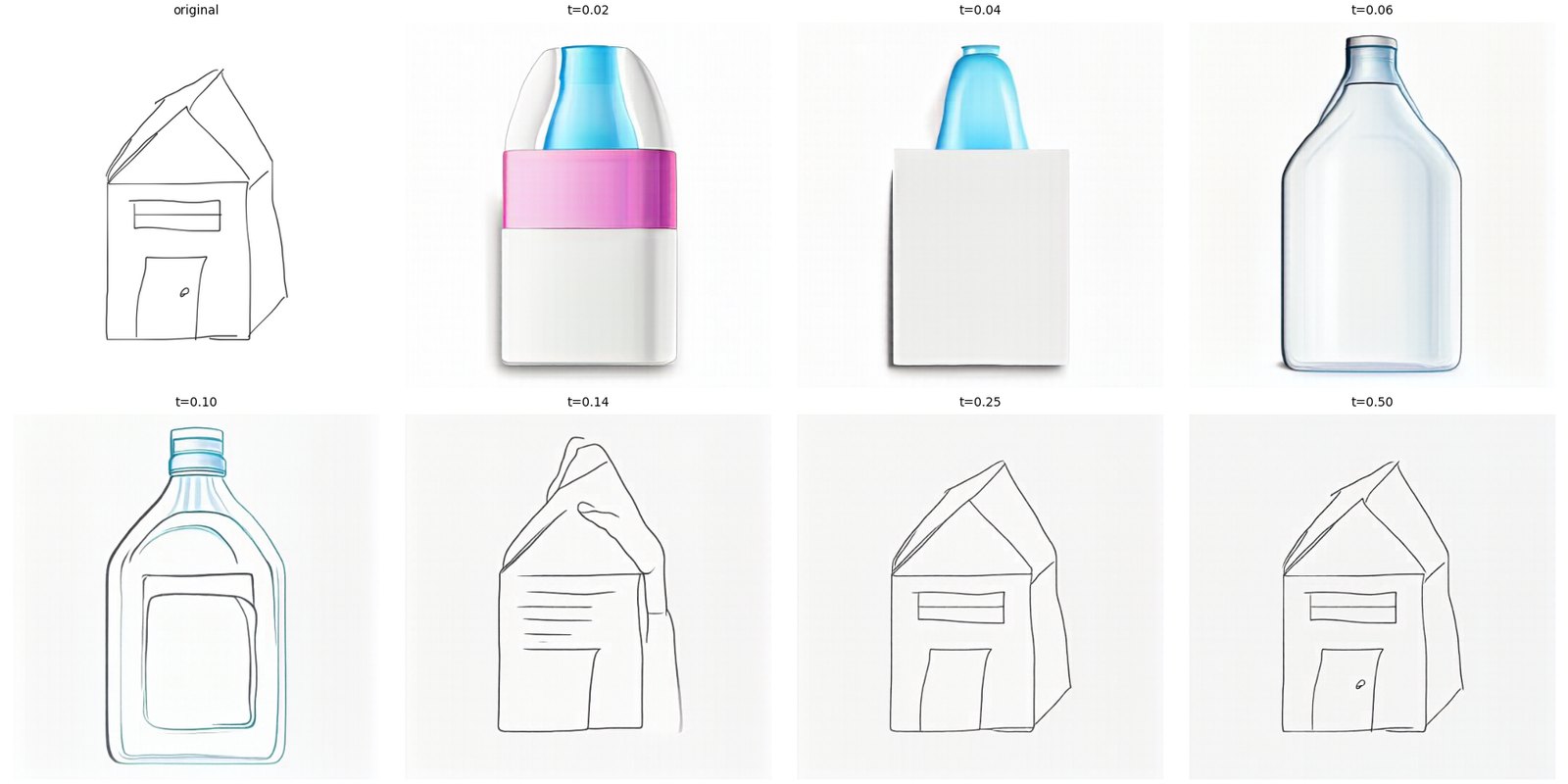
A box with a peaked top reads as a bottle outline, so at the low starting times the house becomes a product bottle, and at 0.10 a line drawing of one. From 0.14 on it's a house sketch again, a bit cleaner than mine.
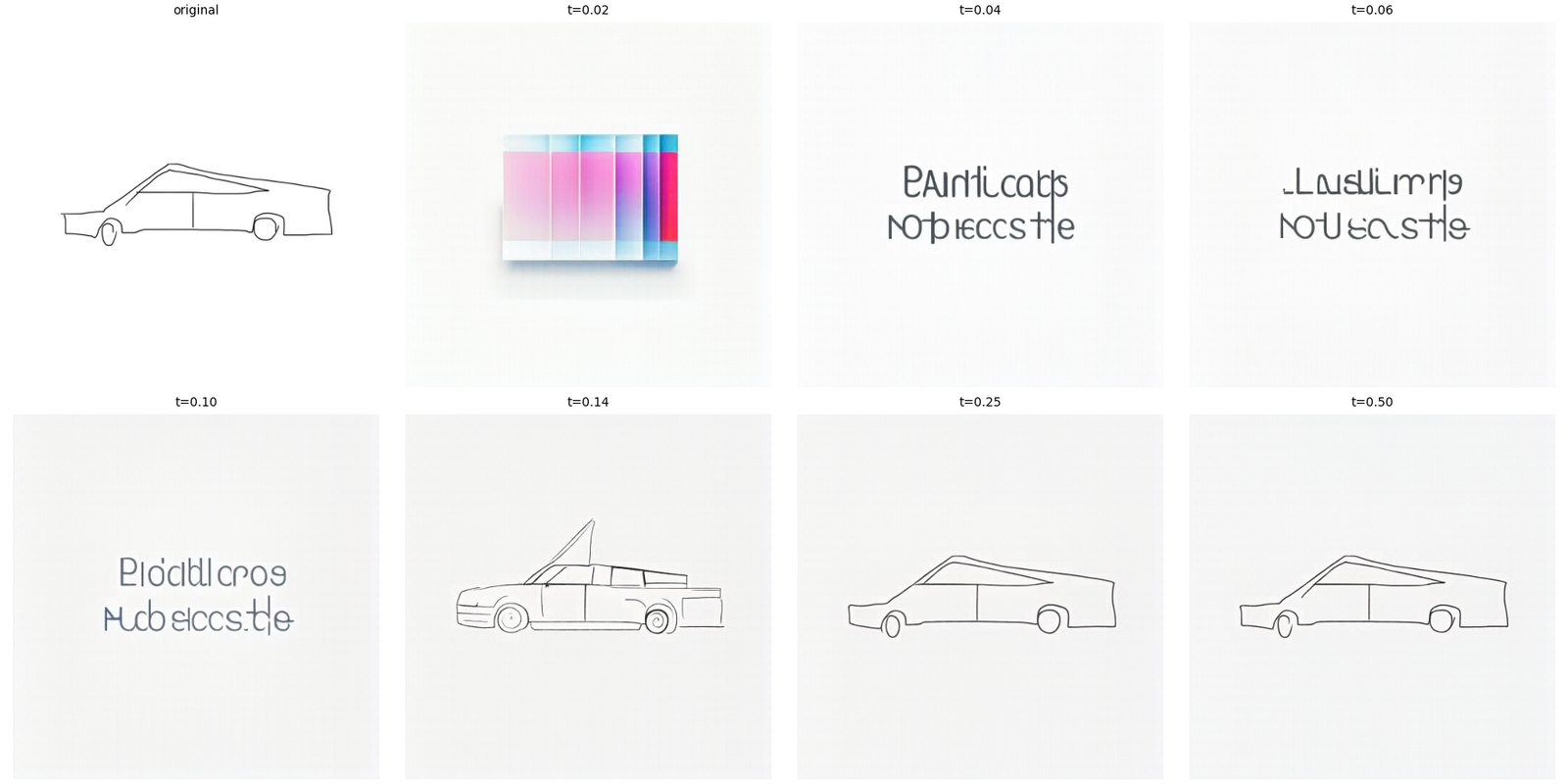
This one was the strangest. The car is so thin and wide that at 0.04 to 0.10 the model reads it as a line of text and writes gibberish letters. At 0.14 it redraws a cleaner car, and from 0.25 on it's my drawing. Neither drawing ever turned into a real photo. I think thin lines are just too little signal, and a filled-in drawing with solid colors would work better.
Part A · 3.2
Text-guided image editing
Same procedure as 3.1, except the prompt describes the edit I want instead of "a high quality photo". The low starting times follow the prompt and the high ones follow the image, and the interesting results are in the middle where both show up.
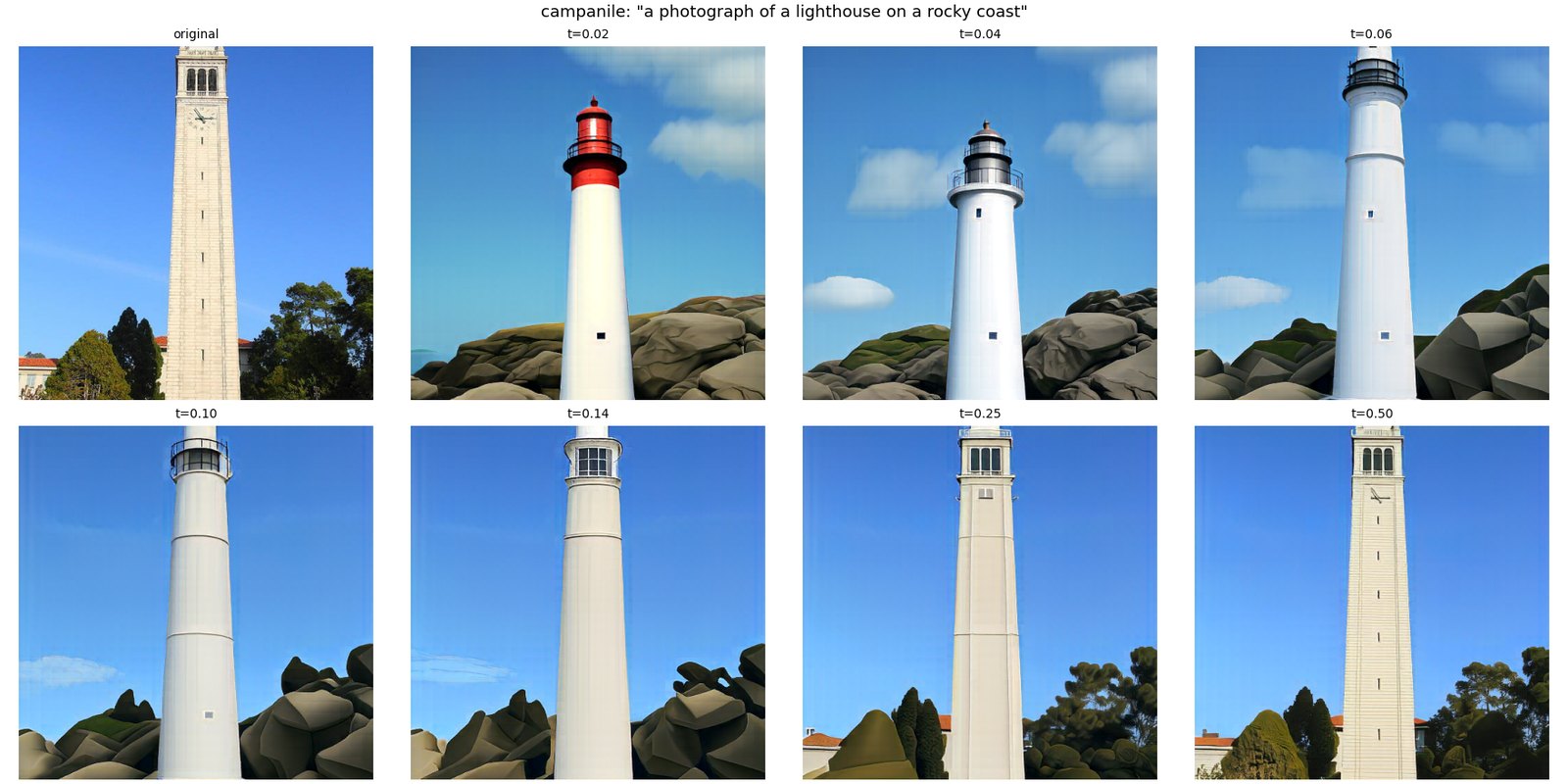
Prompt: "a photograph of a lighthouse on a rocky coast". From 0.02 to 0.14 it's a white lighthouse with a lamp room on top and rocks at the bottom. Since the Campanile is already a tall white tower, the lighthouse takes over easily. At 0.25 it's half and half, the Campanile's top on a lighthouse body, and at 0.50 it's the Campanile again.
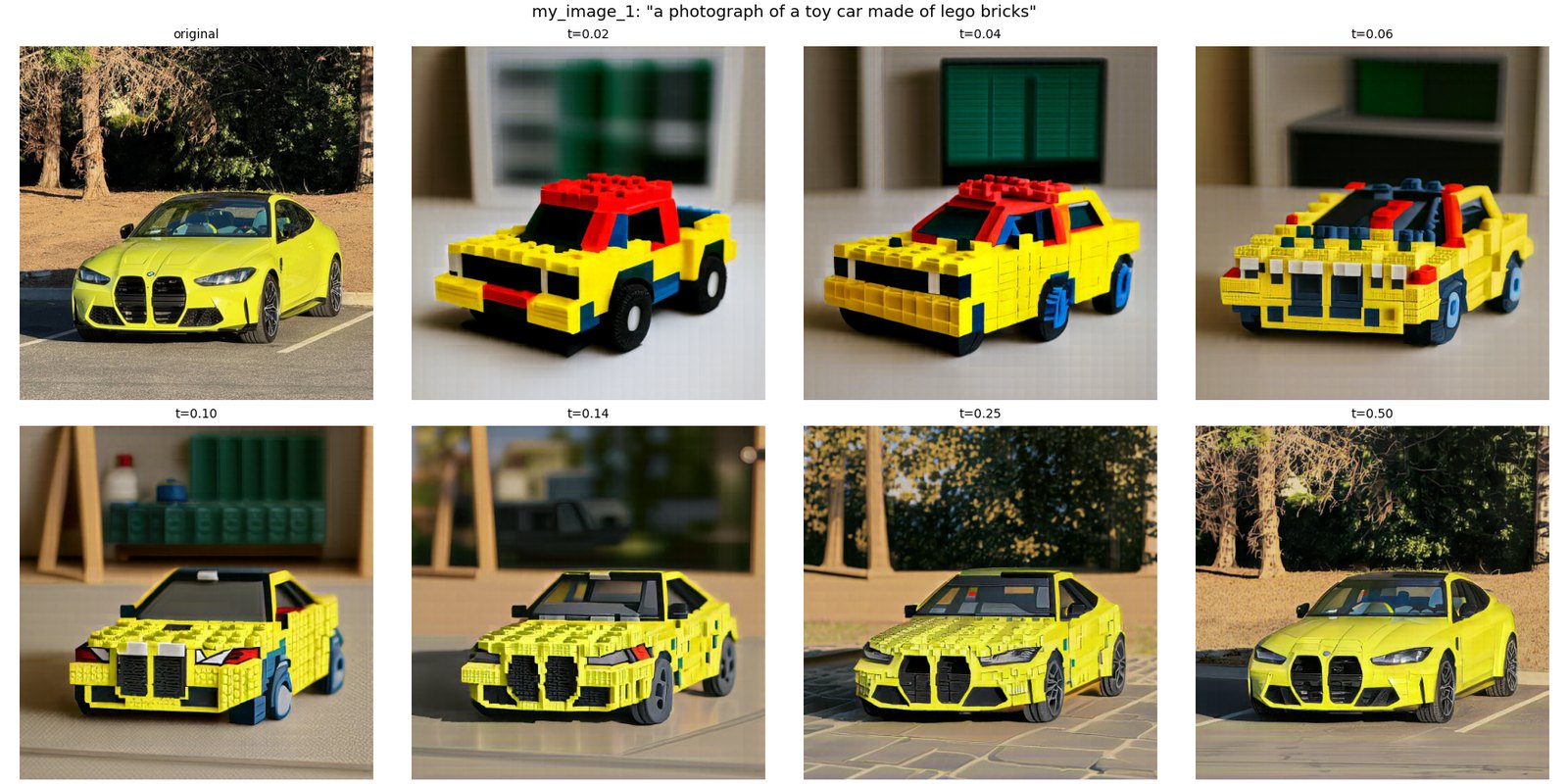
Prompt: "a photograph of a toy car made of lego bricks". My favorite. At the low starting times it's a generic red and yellow Lego truck. At 0.10 and 0.14 it's a Lego version of the M4, with the kidney grilles and headlights still in the right spots. At 0.25 it's the real car covered in Lego texture, still in the same parking lot.
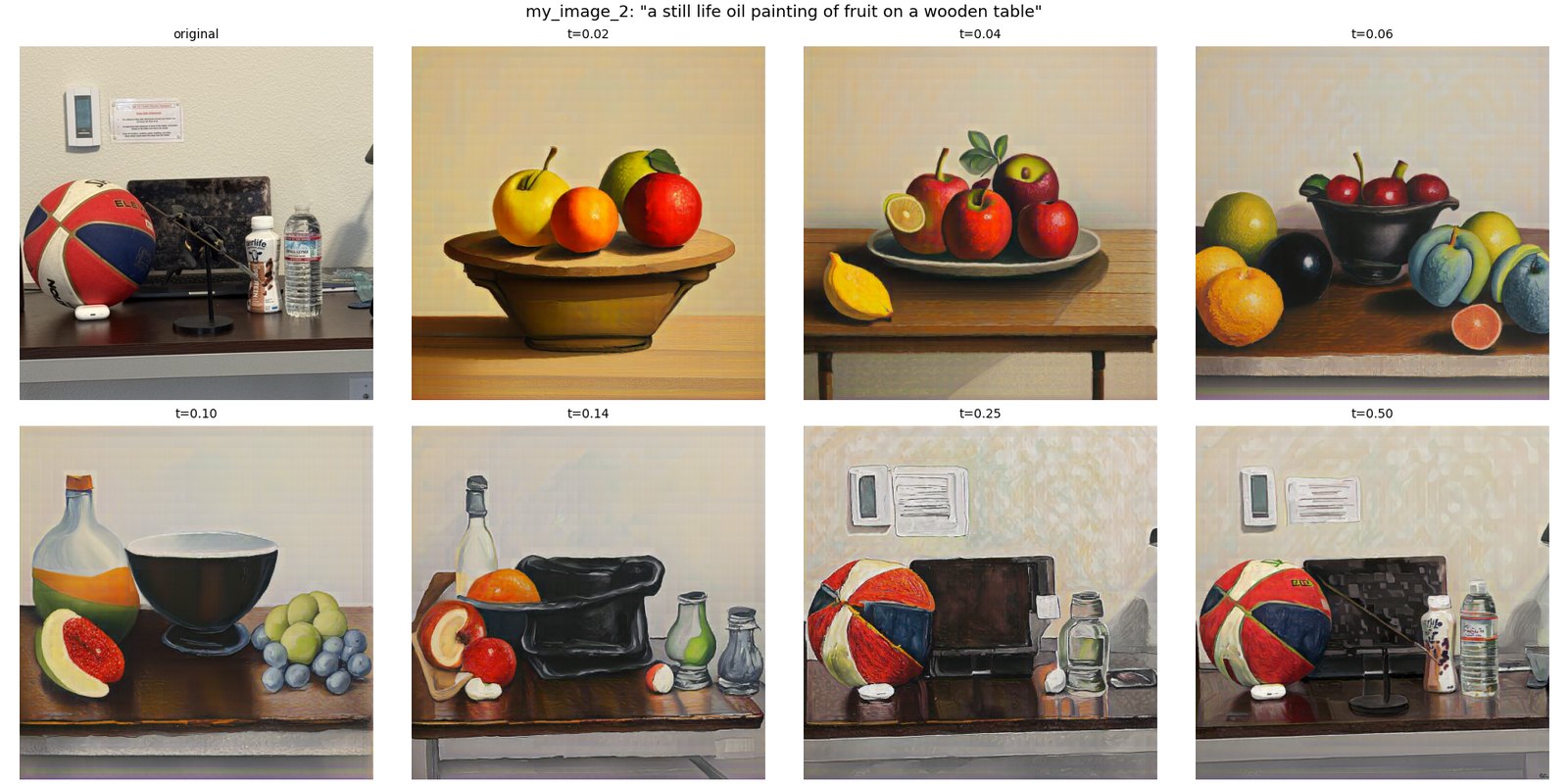
Prompt: "a still life oil painting of fruit on a wooden table". At first it's a normal fruit bowl painting. At 0.10 and 0.14 the objects on my desk turn into still life objects: the basketball becomes a pomegranate, the laptop becomes a black cooking pot, and the bottles become glass jars. At 0.25 and 0.50 it's an oil painting of my actual desk, basketball included.
Part A · 3.3
Visual anagrams
A visual anagram is one image that shows one thing right side up and something else upside down. At every Euler step I predict two guided velocities: one for prompt A on the image as it is, and one for prompt B on the image turned upside down. The second velocity gets turned back upright so both are in the same frame, then I average them and take the step. The final image has to satisfy both prompts at once, one in each orientation.
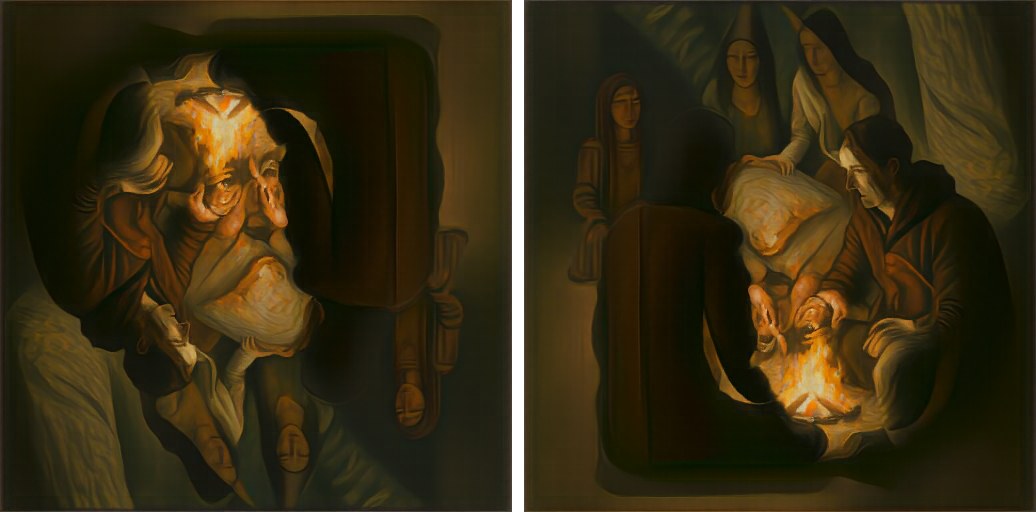
First the course's pair, to check that my version works: "an oil painting of an old man" and "an oil painting of people around a campfire". Upright it's an old man with a white beard, and upside down his lit-up forehead becomes the fire.
My three
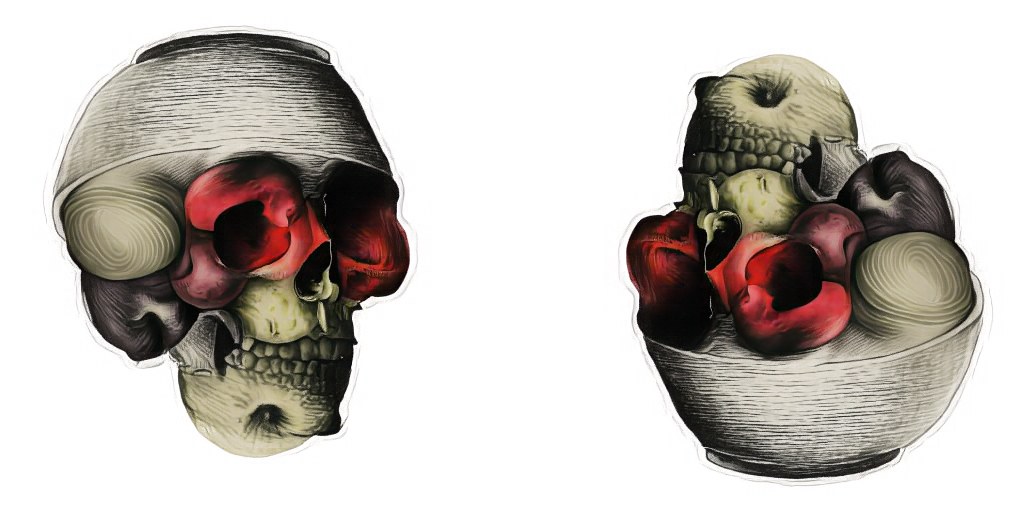
"a lithograph of a skull" / "a lithograph of a bowl of fruit". Upright, apples sit in the eye sockets and the teeth run along the bottom. Upside down, the top of the skull becomes the bowl. This was my best one.
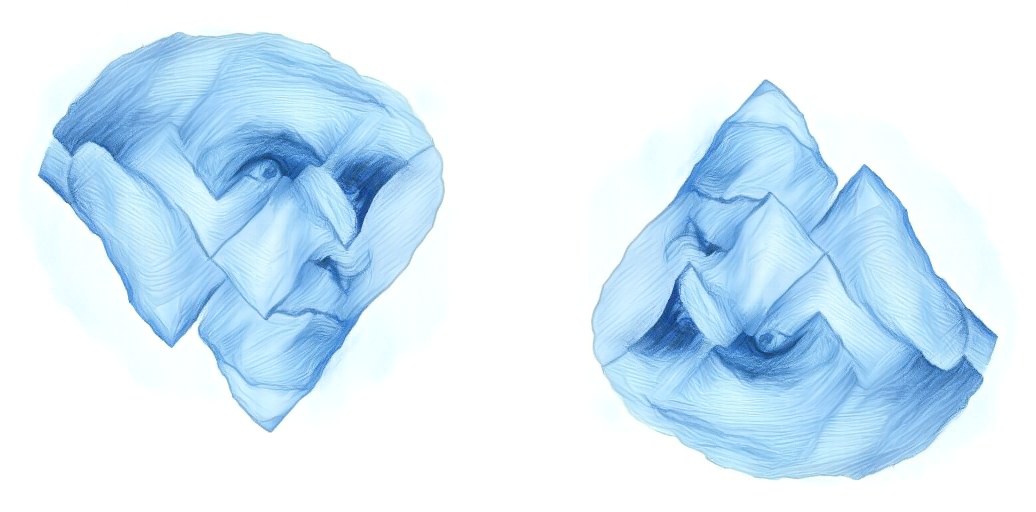
"a charcoal drawing of a face" / "a charcoal drawing of a mountain range". A blue charcoal face, and upside down its brow and nose turn into snowy peaks.
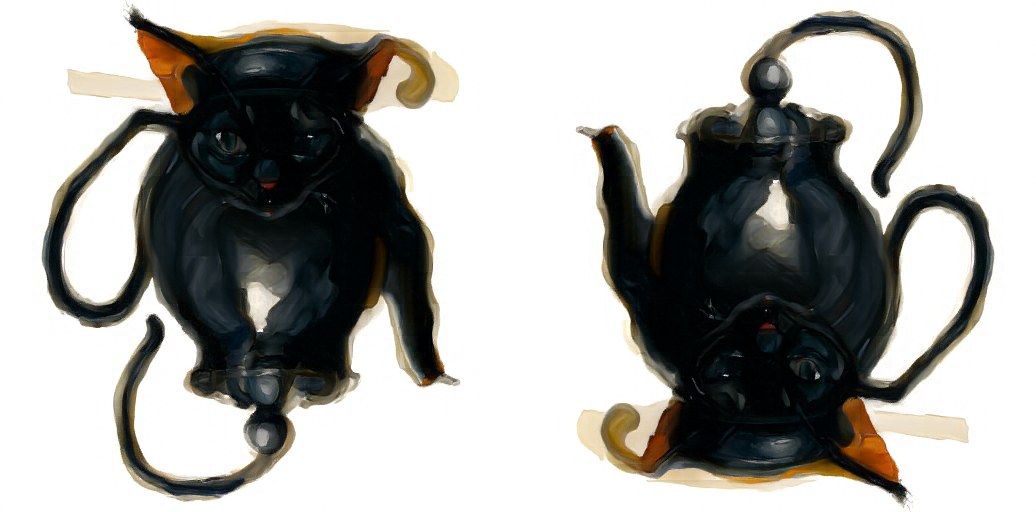
"an oil painting of a cat" / "an oil painting of a teapot". A black cat with pointed ears, and upside down its ears become the teapot's legs and its tail becomes the handle. The cat is a little blobby, but both read.
What didn't work

Not every pair works. Flowers and a duck came out as a duck both ways, and the flowers never showed up. Sailboat and fox was a clear fox upside down with no real sailboat. Forest and city skyline technically worked, but the model cheated: it split the picture into a top half and a mirrored bottom half, like a reflection in a lake, so each half only had to be one thing. The pairs that worked were ones where both subjects can share the same shapes, like round fruit and round eye sockets, or a cat's ears and a teapot's legs.
Part A · 3.4
Hybrid images
A hybrid image looks like one thing up close and something else from far away, like the ones I made in Project 2. Here the hybrid gets built during sampling instead of from two finished photos. At every step I predict guided velocities for both prompts, keep the low frequencies of the far prompt's velocity and the high frequencies of the close prompt's velocity, and add them: v = lowpass(vfar) + vnear − lowpass(vnear). The low pass is the provided Gaussian blur with a 265 pixel kernel and σ = 16.
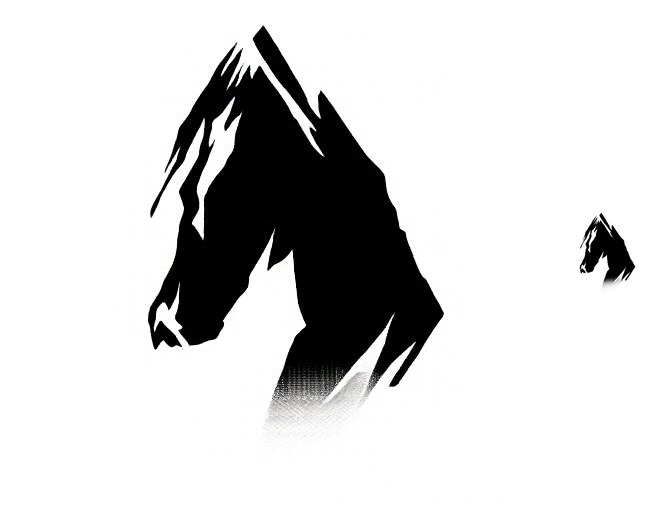
Far: "a lithograph of a horse". Near: "a lithograph of mountains". Shrunk down it's a black horse head. Up close the jagged edges and white streaks turn into snowy mountain ridges.
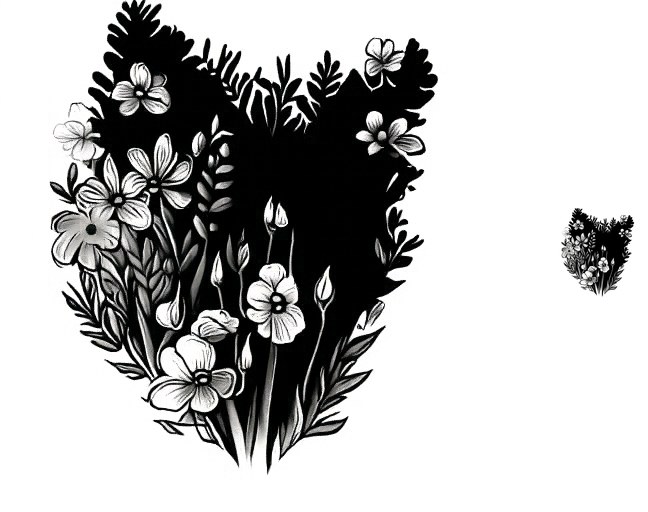
Far: "a lithograph of a close up of a cat's face". Near: "a lithograph of a flower garden". From far away it's the black silhouette of a cat's head, ears and all. Up close it's a bunch of flowers and leaves.
What didn't work
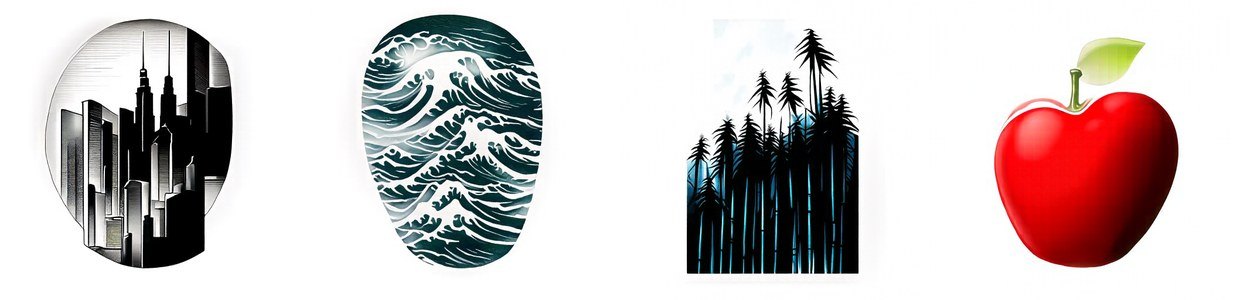
These were a lot harder than the anagrams. I tried twelve pairs and two of them worked. In almost every run the far prompt only controlled the outline of the picture, and the close prompt filled the inside with its own subject. A skull turned into a skull-shaped city, and a smiling face turned into an oval full of ocean waves. My guess is that the σ = 16 low pass keeps the overall shape but not enough of the smaller features like eyes and a mouth, and every "lithograph" prompt put its subject on plain white paper, which leaves even less for the low frequencies to show. The ones that worked are subjects you can recognize from their silhouette alone, like a horse's head or a cat's ears.
Part A · Bells & whistles
Extra: more anagrams and a course logo
More visual anagrams
The Visual Anagrams paper points out that flipping upside down is only one option. Any view works as long as it only moves pixels around or flips their sign, since then pure Gaussian noise still looks like pure Gaussian noise after the view, and the model can denoise the transformed image like normal. I added two: a quarter turn and color inversion. The algorithm is the same as 3.3 with a view F and its inverse in place of the rotation: average v(x, a) and F−1(v(F(x), b)).
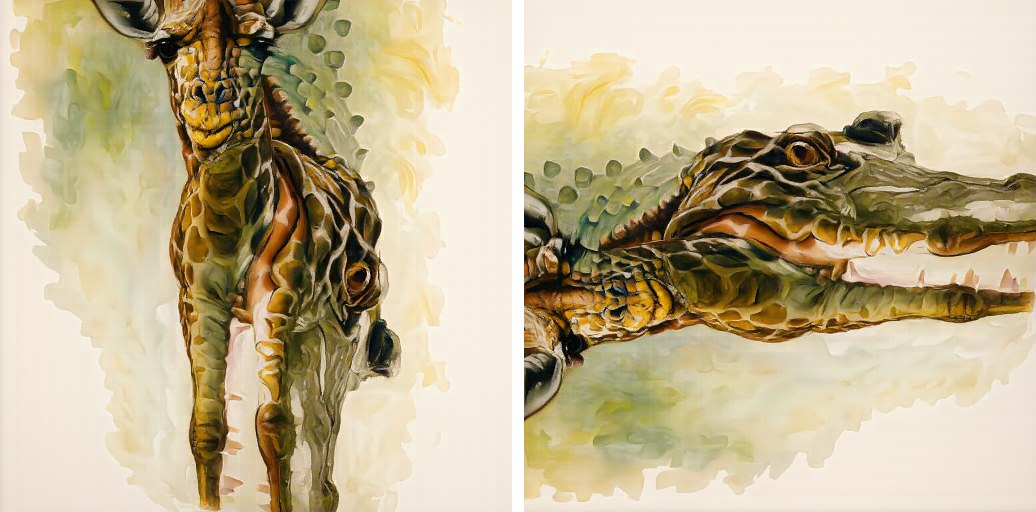
Quarter turn: "an oil painting of a giraffe" / "an oil painting of a crocodile". Upright it's a spotted giraffe. Turned on its side, the giraffe's long neck becomes a crocodile's snout, teeth and all, and the spots turn into scales.
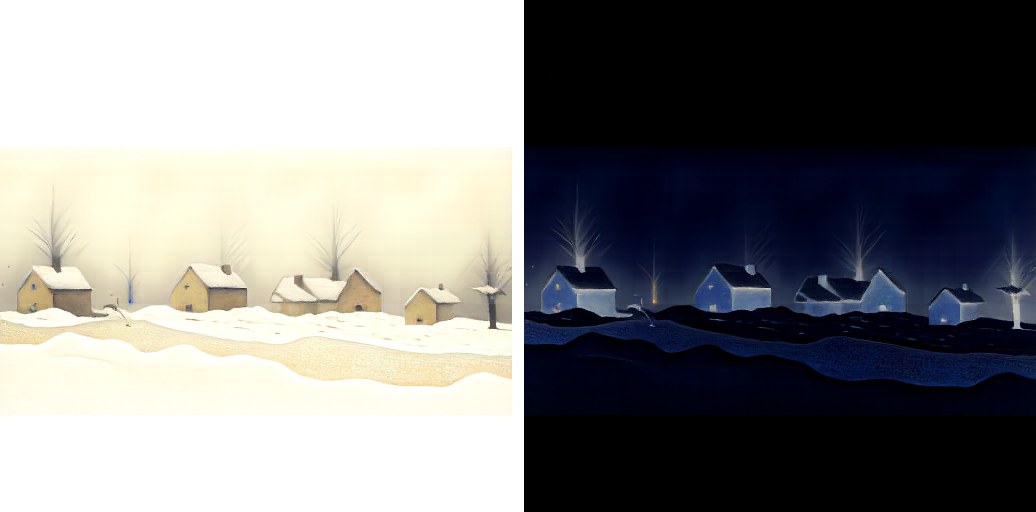
Color inversion: "an oil painting of a snowy village" / "an oil painting of a starry night sky". Normally it's a snowy village during the day. Inverted, the bright snow and sky go dark and the dark walls light up, so it becomes the same village at night with glowing windows. The "starry" part only half worked, since the sky is dark but there aren't really any stars.
Two other candidates didn't work. Tree / river came out as a tree, and sideways it only reads as a riverbank. Polar bear / black cat is a fun failure: the model drew a white cat instead of a polar bear, because a white cat turns into a black cat for free when you invert it.
A course logo
For a course logo I ran the text-guided editing from 3.2 on the Campanile with the prompt "a minimalist flat vector logo of a clock tower, navy blue and gold". Lower starting times give the model more room to redraw it as a flat graphic, and higher ones keep more of the photo.
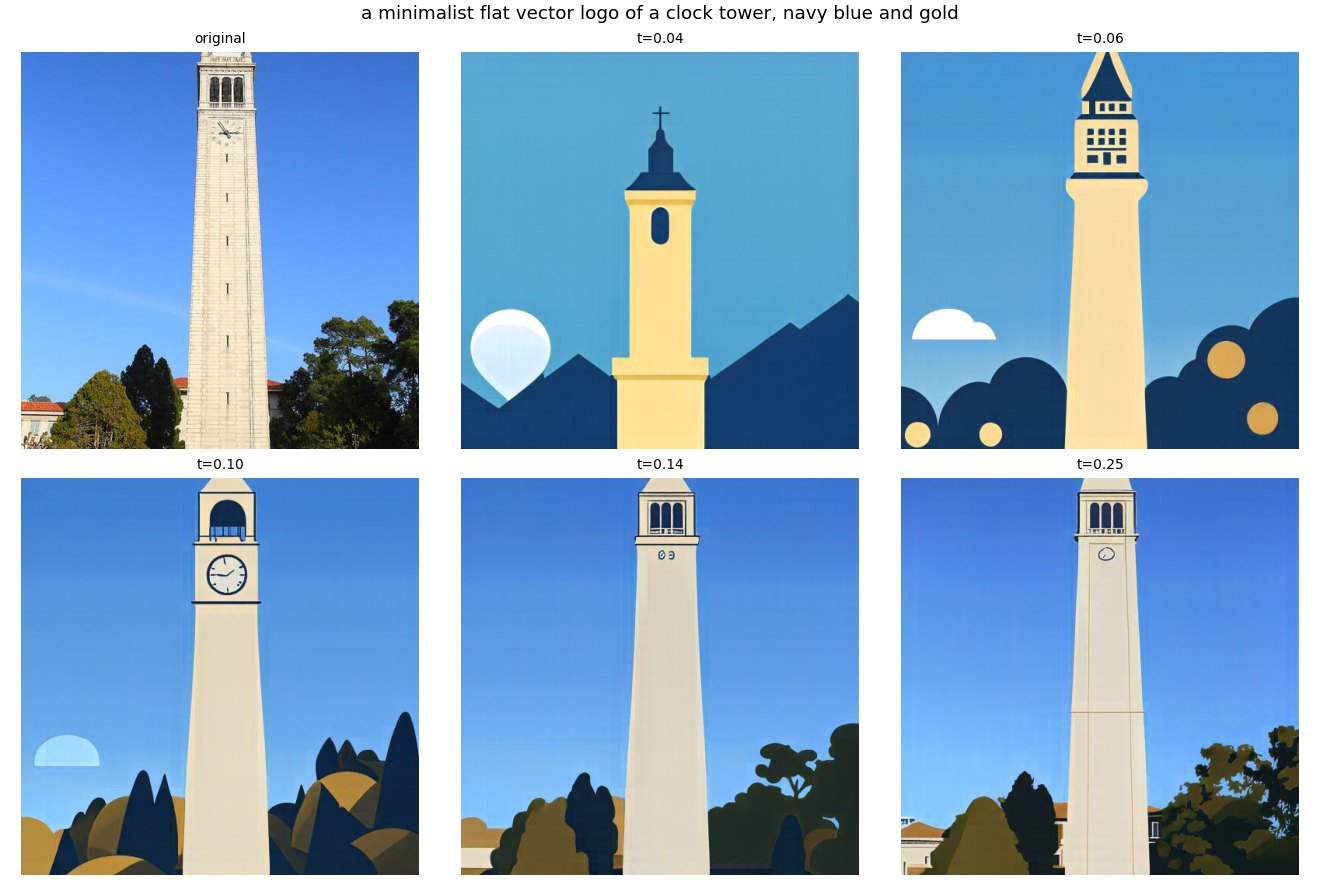
At 0.04 and 0.06 it stops being the Campanile and turns into a generic flat church steeple with navy hills. At 0.10 it's my favorite: a flat Campanile that still has its clock face and arched belfry, with navy and gold trees at the bottom. That's the one I'd use as the logo. By 0.14 and 0.25 it's mostly the photo again, with flat-shaded trees.
Project 3 · Part B
Flow Matching
from Scratch
Part B · 1.1
A single-step denoising UNet
In Part B I trained my own flow matching model from scratch on MNIST. First a plain one-step denoiser, to see why one step isn't enough to generate anything, then a UNet that learns the flow from noise to digits, first with only time as input and then with the digit's class too.
The denoiser is a UNet. It shrinks the 28×28 digit down to 14×14, then 7×7, then a single 1×1 summary, and then grows it back up. At each size on the way back up it concatenates the matching tensor from the way down. Those skip connections let fine detail jump straight across instead of having to squeeze through the bottleneck.
I built it from the course's blocks: Conv, DownConv and UpConv (each a convolution with batch norm and GELU), Flatten (a 7×7 average pool), Unflatten (a 7×7 transposed convolution), and ConvBlock, DownBlock and UpBlock, which stack two of those for more depth. With D = 128 hidden channels it has 7.89 million parameters.
Part B · 1.2
Noising digits
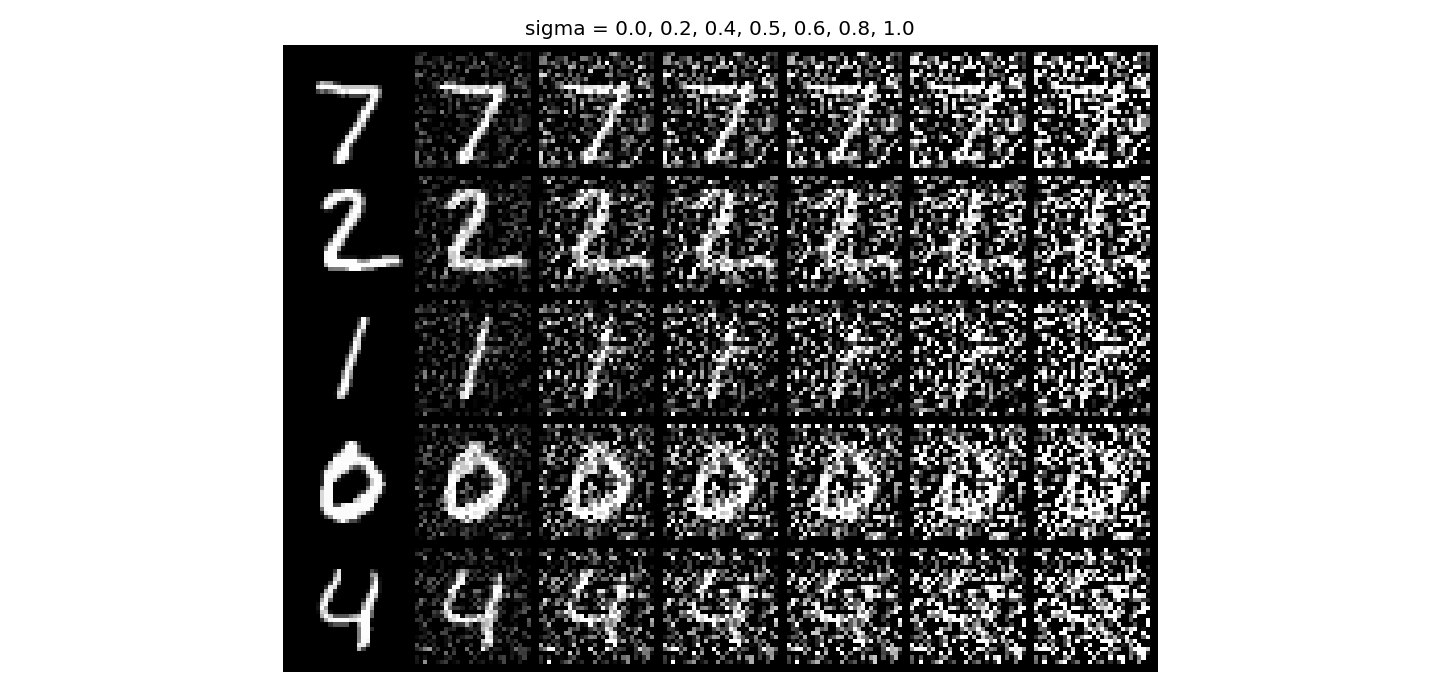
To train a denoiser I need pairs of noisy and clean digits. Here the noisy digit is z = x + σ·ε. That's plain added noise, without the scaling of the image that Part A's path used. These are five test digits at σ = 0, 0.2, 0.4, 0.5, 0.6, 0.8 and 1.0, all using the same noise draw so only σ changes.
Part B · 1.2.1
Training the denoiser at σ = 0.5
I trained it to map z back to x with an L2 loss at σ = 0.5, for 5 epochs with batch size 256 and Adam at a learning rate of 1e-4. The noise is drawn fresh every time a batch comes out of the loader, so the model never sees the same noisy digit twice. I plotted the loss on a log scale, since the first few steps are around 40 times larger than the rest and squash a normal plot flat.
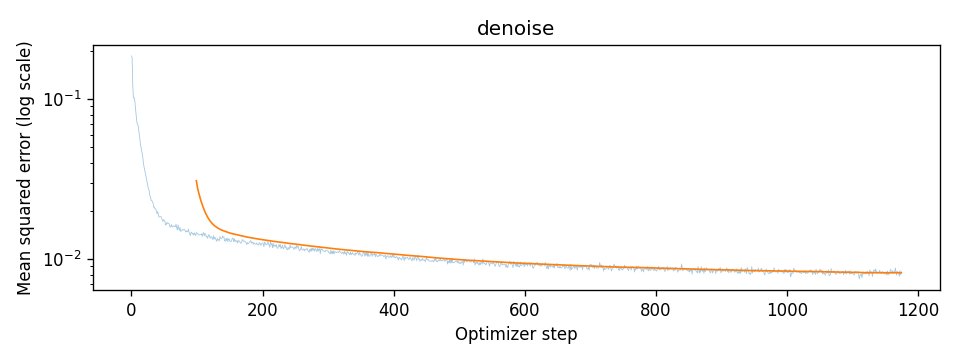
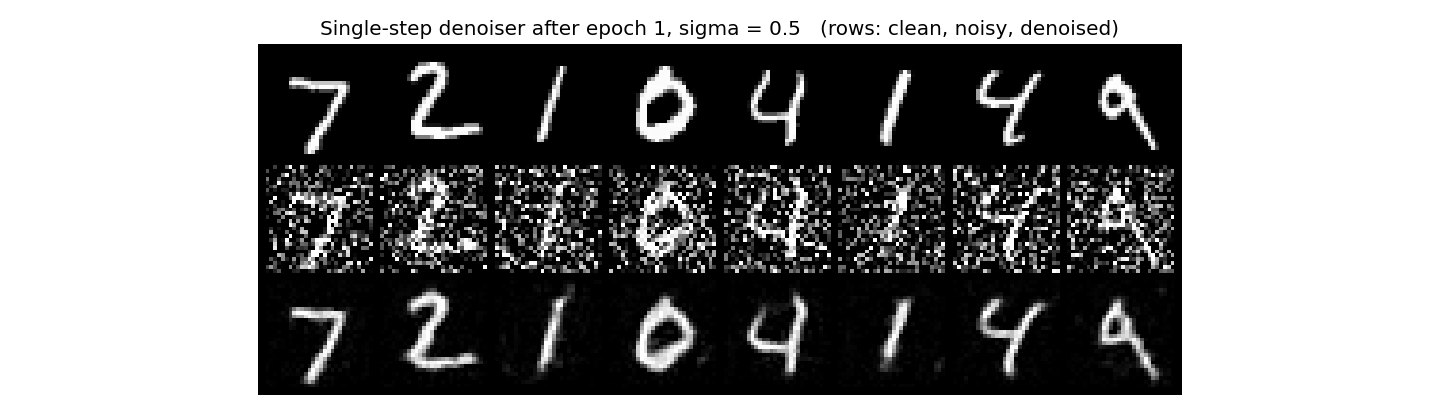
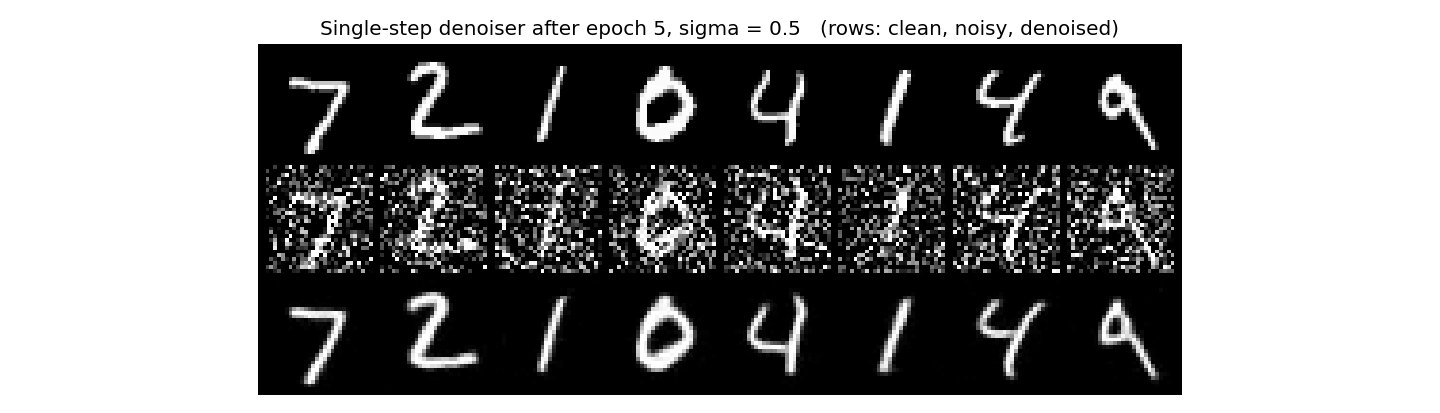
After 1 epoch the outputs are already the right digits, but they're soft and have gray smudges where the noise was. By epoch 5 they're clean and sharp and look almost like the originals. The loss falls from 0.186 on the very first step to 0.021 averaged over epoch 1, and 0.008 over epoch 5. The cleaned digits do come out a little smoother and more even than real handwriting. With an L2 loss the model predicts the average of all the digits that could have made that noisy image, and an average is smooth.
Part B · 1.2.2
Out-of-distribution noise levels
This model only ever saw σ = 0.5. Here are the same five digits and the same noise draw at every σ from 0 to 1. Each pair of rows is the noisy input and the denoiser's output.
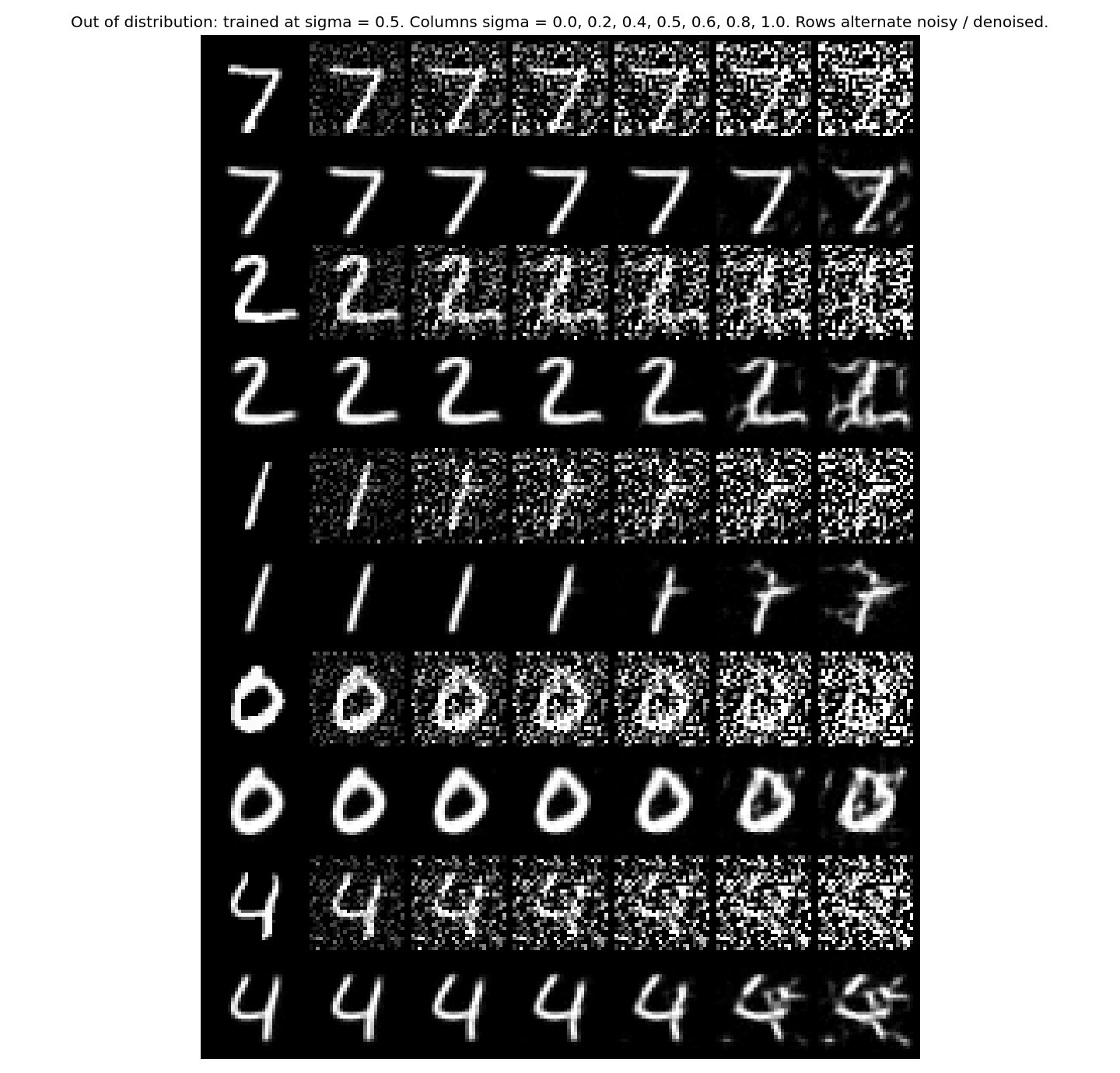
Up to σ = 0.6 the outputs are clean, including at σ = 0, where it gets a perfectly clean digit and gives it back almost unchanged. Past that it falls apart. At 0.8 and 1.0 the outputs pick up extra strokes and the 1 turns into a 7. With more noise than it's used to, it treats some of the noise as part of the digit and draws it in. The average error against the clean digits grows steadily the further σ gets from 0.5:
| σ | 0 | 0.2 | 0.4 | 0.5 | 0.6 | 0.8 | 1.0 |
|---|---|---|---|---|---|---|---|
| MSE | 0.0027 | 0.0033 | 0.0052 | 0.0070 | 0.0104 | 0.0235 | 0.0442 |
Interestingly the error is lowest at σ = 0, below the noise level it was trained on, so it handles less noise fine. It's more noise that breaks it.
Part B · 1.2.3
Denoising pure noise
Same UNet and same training settings, but now the input is pure Gaussian noise with no digit in it at all, and the target is still a clean digit. In theory, a model that could do this would be a generator.
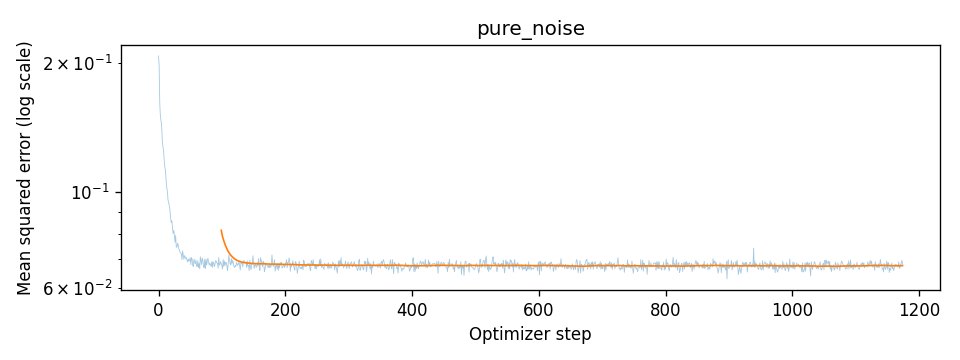



Every output is the same blurry blob, no matter which noise goes in, and it doesn't change from epoch 1 to epoch 5. It looks like a 0, 3, 8 and 9 stacked on top of each other. The loss drops for about 100 steps and then goes completely flat at 0.067.
That's because the input tells the model nothing. Pure noise is independent of which digit it's supposed to become, so the best possible guess under an L2 loss is the single image closest to every training digit at once, which is their average, the same idea as a cluster centroid. I checked this directly. The average of all 60,000 training digits has a mean squared error of 0.0673 against the training set, and the model's loss levels off at 0.0675, almost exactly the same. Its outputs are within 0.010 RMS of that average digit and barely change between inputs (0.006). So training on pure noise can only ever learn the mean. To generate real digits the model has to be given partly noisy images and denoise them a little at a time, which is what flow matching does next.
Part B · 2.1 to 2.3
Flow matching with time conditioning
Flow matching needs the UNet to also know where along the path it is. t is a single number per image, so it goes through two small FC blocks (Linear, GELU, Linear), and their outputs multiply two of the decoder's tensors: the 7×7 one right after Unflatten, and the 14×14 one after the first UpBlock. The time embedding scales every channel up or down depending on how noisy the input is. With D = 64 this UNet has 2.00 million parameters.
Training
Training uses the same straight-line path as Part A: xt = (1 − t)·x0 + t·x1, with x0 pure noise and x1 a real digit. The UNet learns the velocity along that line, x1 − x0, with an L2 loss. Every image in a batch gets its own random t between 0 and 1.
Batch size 64, 10 epochs, Adam starting at a learning rate of 1e-2, and an exponential decay of γ = 0.11/10 after each epoch, so the learning rate falls smoothly to 1e-3 by the end.
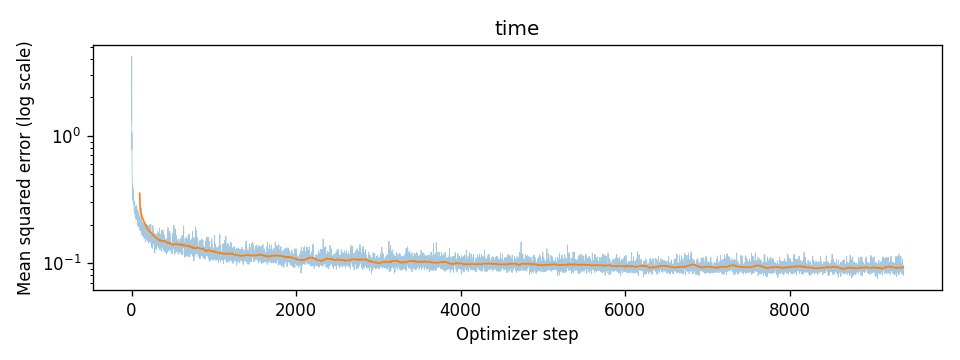
The loss drops from over 4 to about 0.13 in the first few hundred steps, then keeps creeping down to 0.092 over the last epoch. It levels off well above zero, and it has to. A noisy image at a given t could have come from lots of different digits, so the exact velocity can't be predicted from xt alone. The best the model can do is the average over all of them.
Sampling
To generate, I start from pure noise at t = 0 and take 50 Euler steps of size 1/50, x ← x + u(x, t)/50, recomputing the velocity every time. I used the same seed for every checkpoint, so each grid starts from the same 40 noise images.
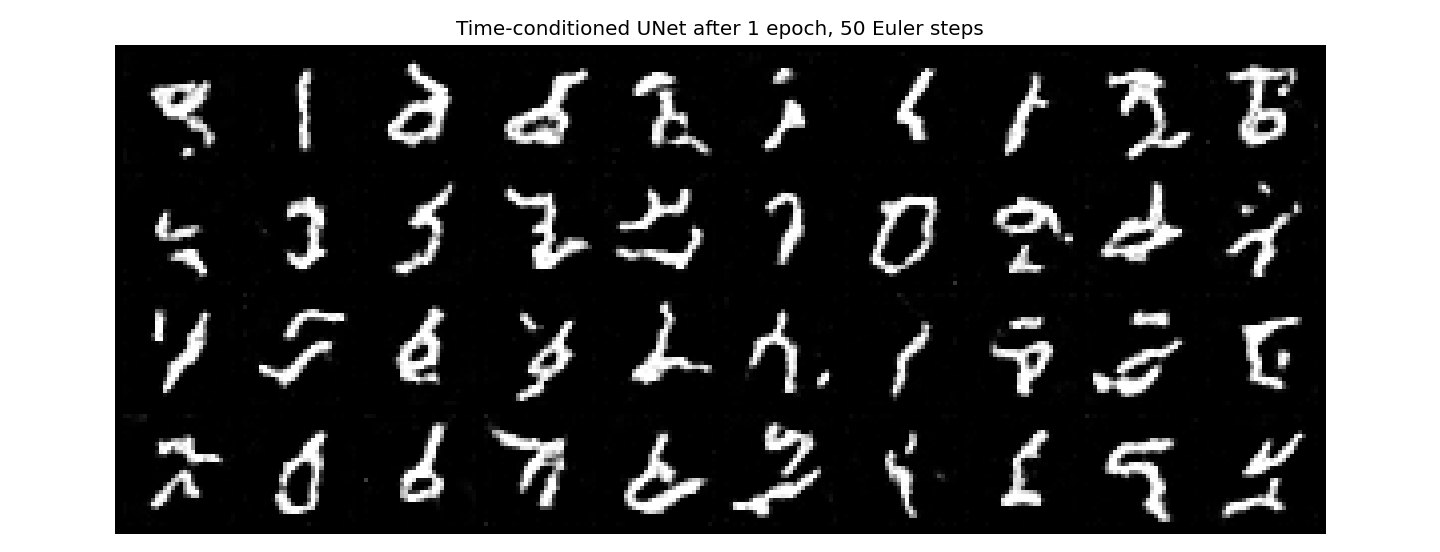
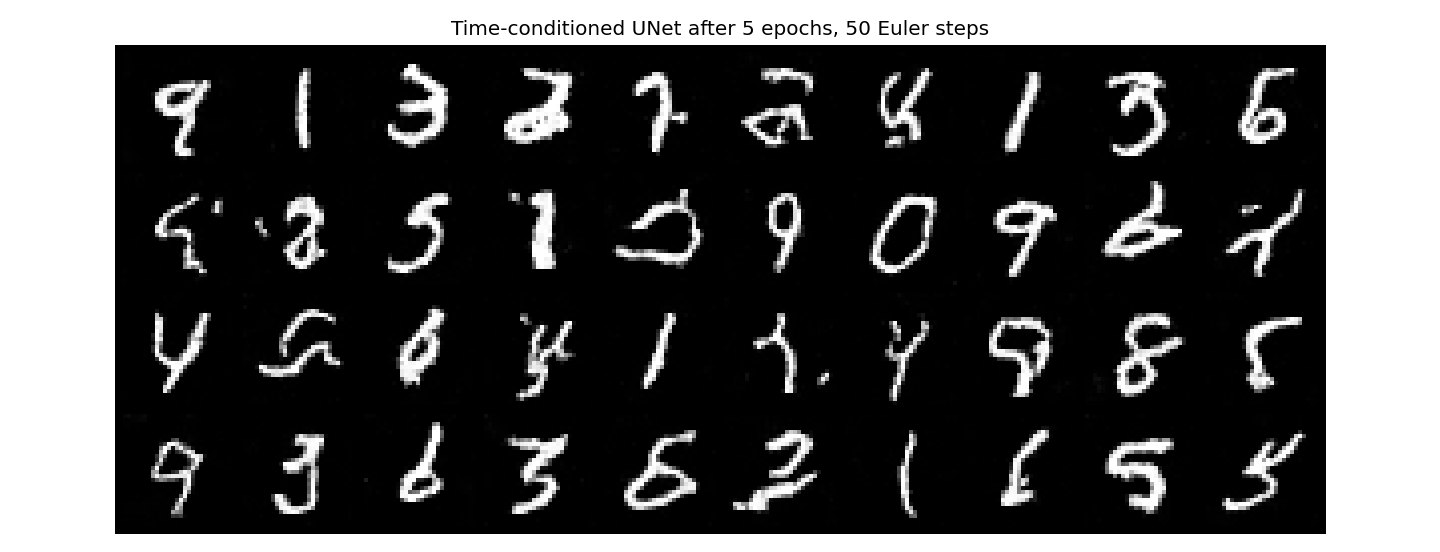
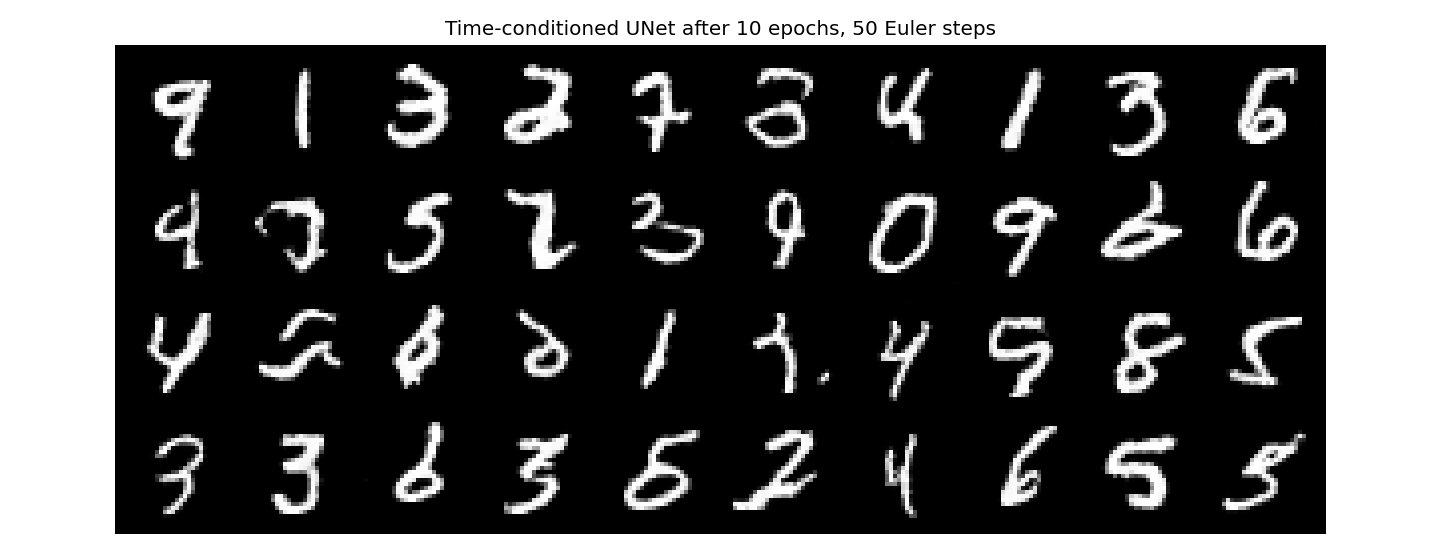
After 1 epoch the samples are white strokes of the right size and thickness, but almost none of them are real digits. After 5 epochs about half are readable, and after 10 most of the 40 are, though around six are still scribbles or two digits blended together. Since every grid starts from the same noise, you can follow individual samples improving, like the 0 in the second row.
Part B · 2.4 to 2.6
Adding class conditioning
Two more FC blocks take the digit's class as a one-hot vector. Now the two decoder tensors become c·tensor + t: the class scales the channels and the time shifts them. During training, 10% of the time the class vector is replaced with zeros. That way the same network also learns to generate without being told the class, which is what classifier-free guidance needs.
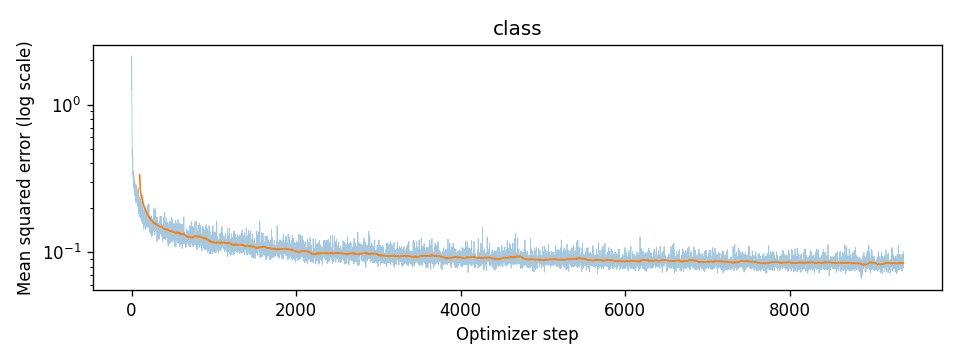
Same shape as the time-only curve, but it ends lower: 0.084 averaged over the last epoch, versus 0.092 without the class. Knowing which digit to make takes away a lot of the uncertainty about where each stroke goes.
Sampling with classifier-free guidance
Sampling runs the model twice per step, with the class and without, and combines them as u = uuncond + γ(ucond − uuncond) with γ = 5, using 300 Euler steps. This is a different way of writing guidance from Part A's. Rearranging gives ucond + (γ − 1)(ucond − uuncond), so γ = 5 here is the same as w = 4 in Part A. Each grid has four samples of each digit, one digit per column, with the same seed at every checkpoint.
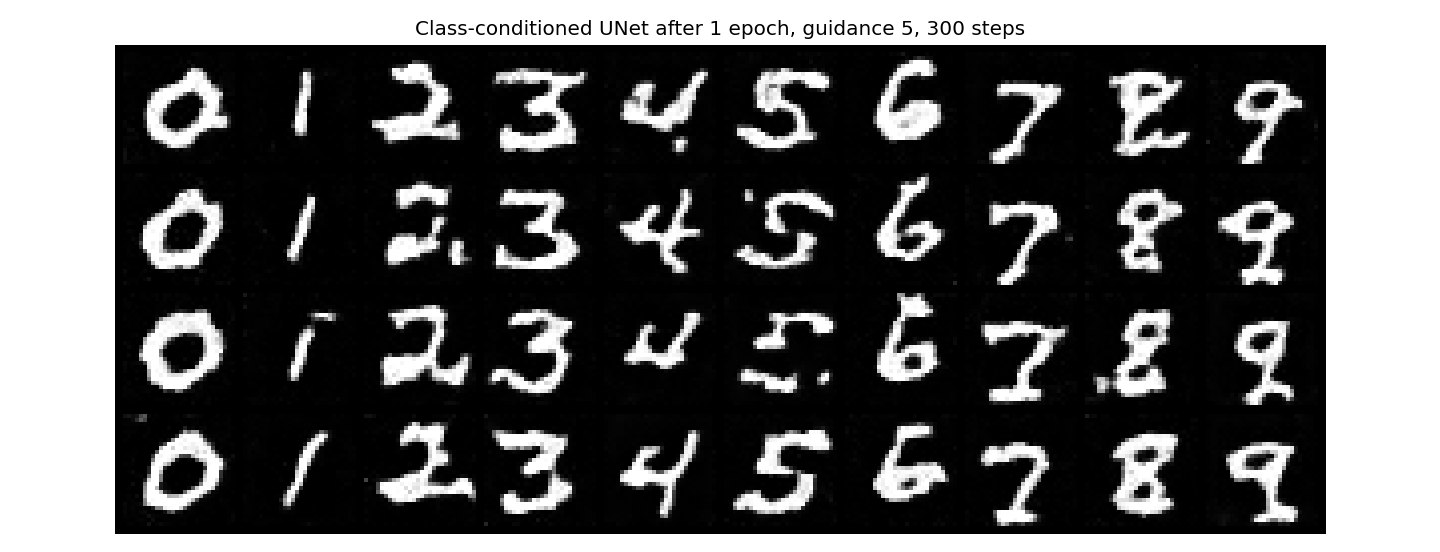
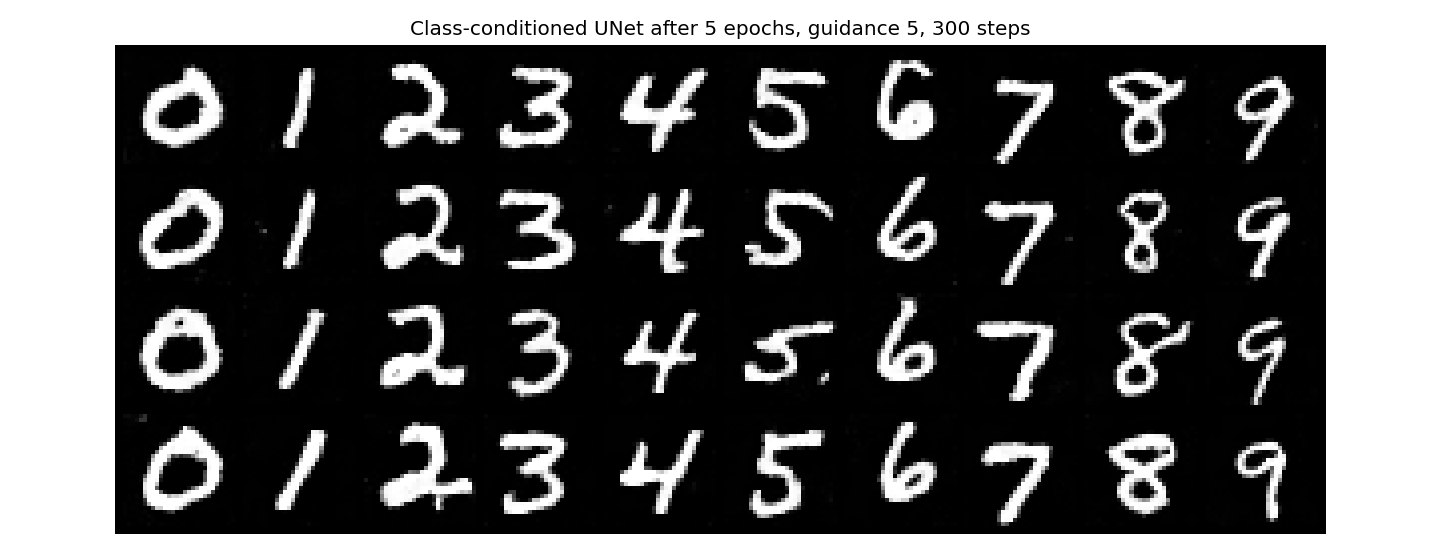
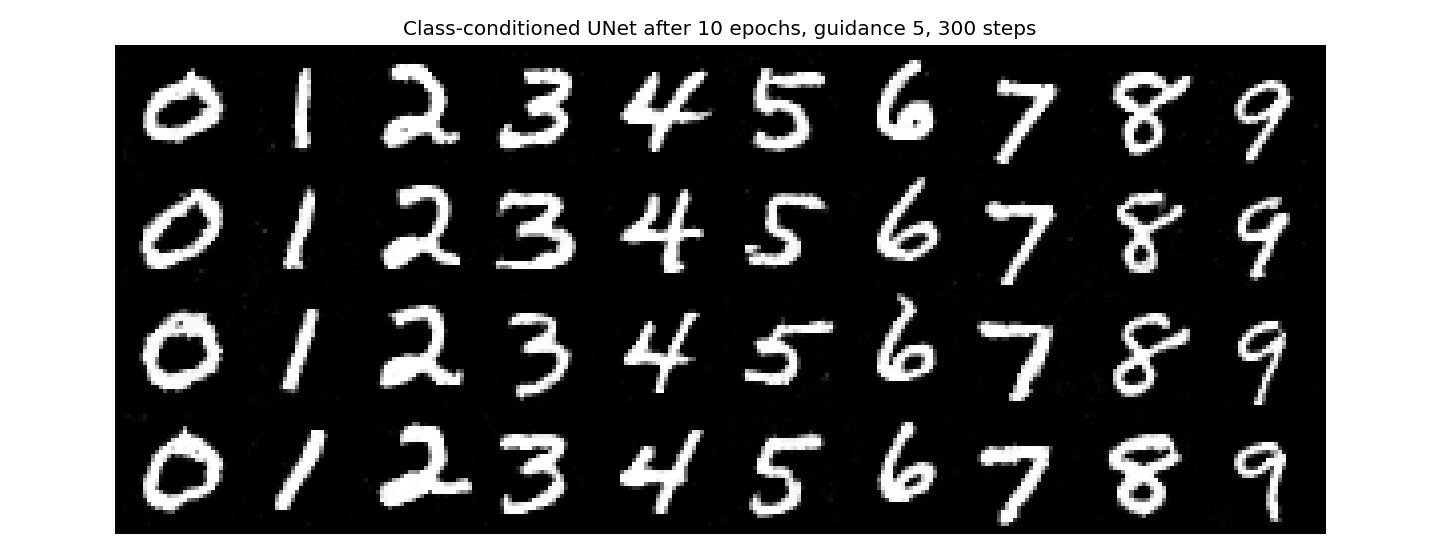
After just 1 epoch every column is already the right digit, which the time-only model never fully managed in 10. The strokes are blotchy and a few of the 8s and 9s are broken. By 5 epochs all 40 are clean, and the last 5 epochs mostly smooth the strokes out. The four copies of each digit vary a little in slant and thickness, but less than real handwriting does, since guidance pushes every sample toward the most typical version of its digit.
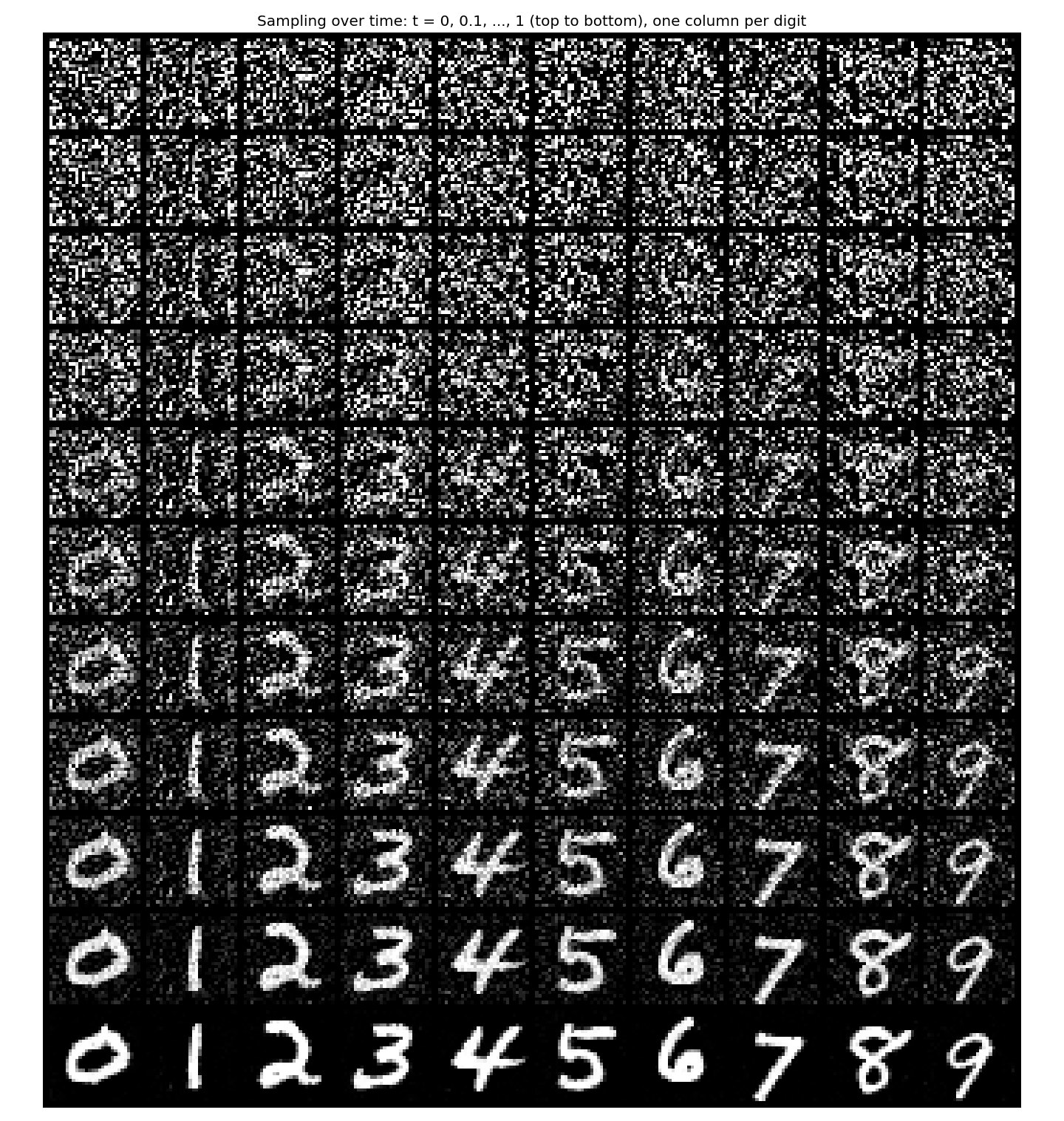
For the first 40% of the steps there's nothing to see. Around t = 0.5 a rough version of each digit shows up, and most of the remaining steps just clean the leftover noise off the background.
Part B · 2.6
Getting rid of the learning rate scheduler
The scheduler starts the learning rate at 1e-2 and shrinks it to 1e-3 over the 10 epochs. To see what it actually does, I took it out and trained three more class-conditioned models with a constant learning rate: 1e-2 (deleting the scheduler and changing nothing else), 3e-3, and 1e-3, which is where the schedule ends up. All four runs start from the same seed, so they get the same starting weights, batches, times, noise and dropped labels. The learning rate is the only difference.
| run | epoch 1 | epoch 2 | epoch 5 | epoch 10 |
|---|---|---|---|---|
| scheduled, 1e-2 → 1e-3 | 0.1606 | 0.1100 | 0.0918 | 0.0842 |
| constant 1e-2 | 0.1606 | 0.1105 | 0.0932 | 0.0869 |
| constant 3e-3 | 0.1473 | 0.1102 | 0.0940 | 0.0862 |
| constant 1e-3 | 0.1392 | 0.1055 | 0.0925 | 0.0854 |
Average training loss over each epoch. The scheduled run and constant 1e-2 have exactly the same epoch 1 loss, which makes sense because the scheduler doesn't change anything until after the first epoch. That also confirms the runs really are identical apart from the learning rate.
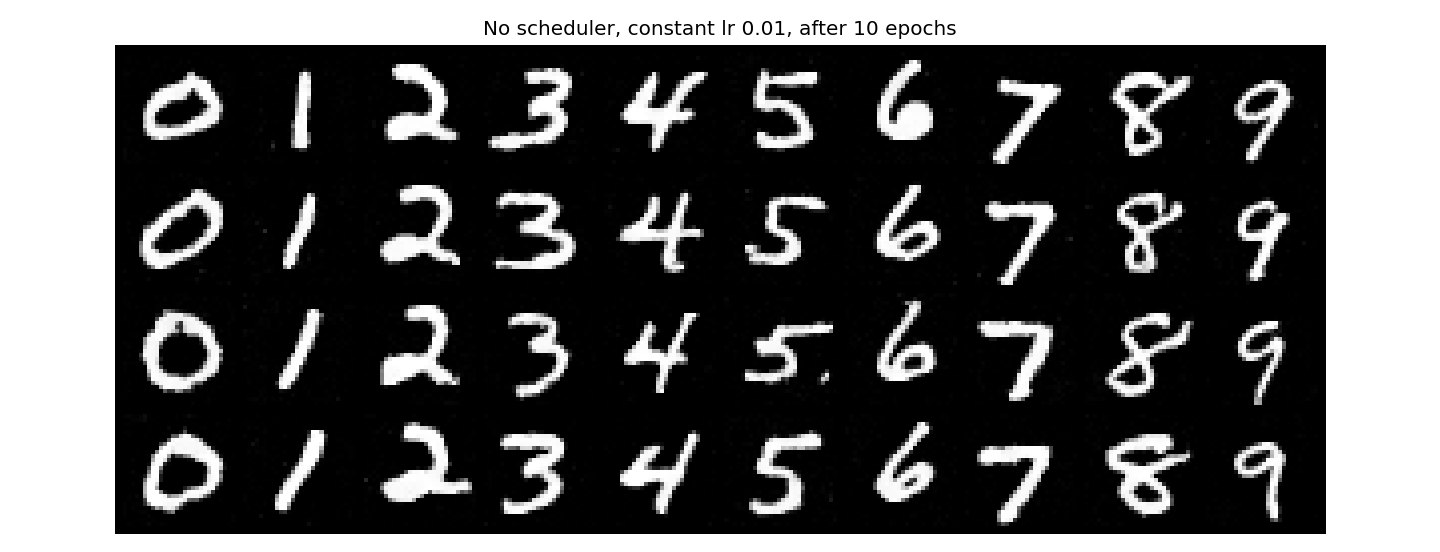
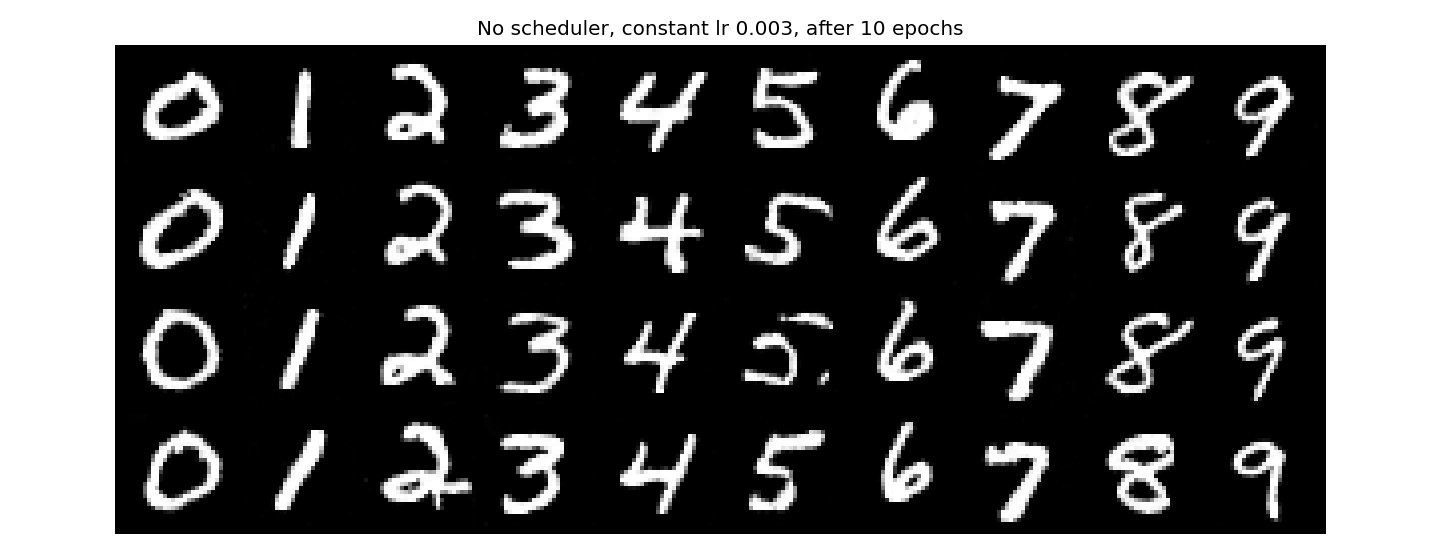
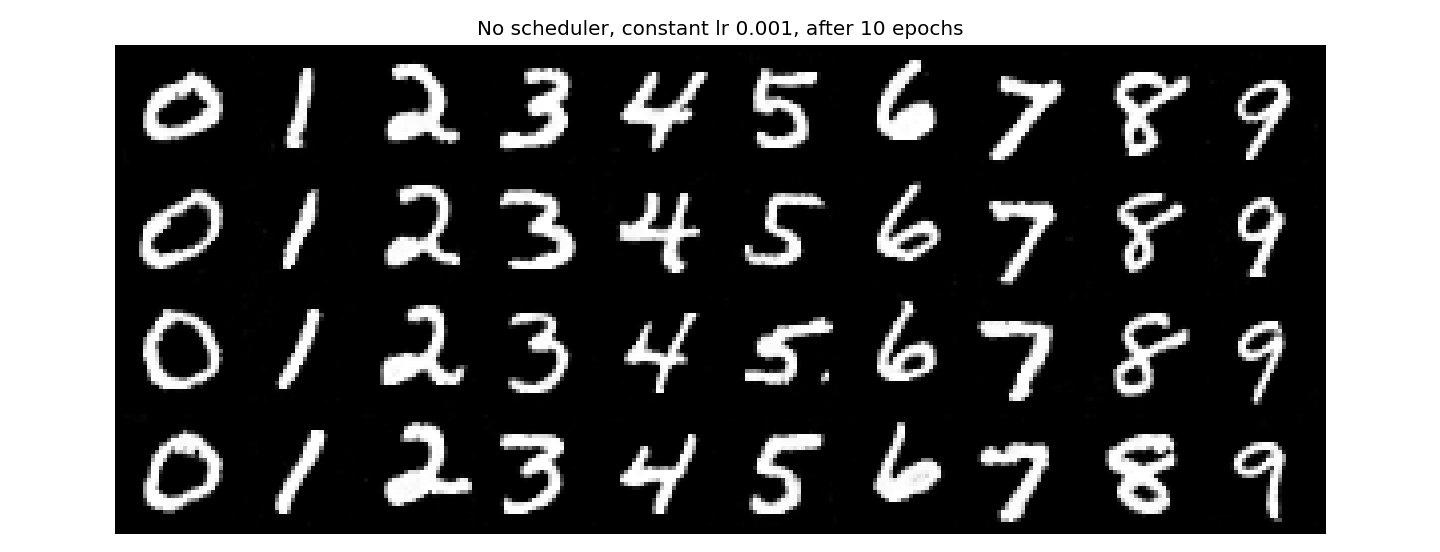
All four make clean, readable digits after 10 epochs, so for a model this small the scheduler isn't doing anything you can see in the samples. The loss shows the difference better. Just deleting the scheduler (constant 1e-2) ends up worst, at 0.0869. My guess is that the big steps that help early keep knocking the weights around late in training, when they should be settling.
A constant 1e-3 comes closest to the scheduled run, 0.0854 versus 0.0842, and it's actually ahead for the first two epochs. A learning rate of 1e-2 is just too big for the start of training here. So what I did to make up for losing the scheduler was use a constant learning rate ten times smaller, equal to the schedule's final value. It gives the same quality samples with one less moving part, and costs about 0.001 of final loss.
Part B · Bells & whistles
Trying for a better time-only UNet
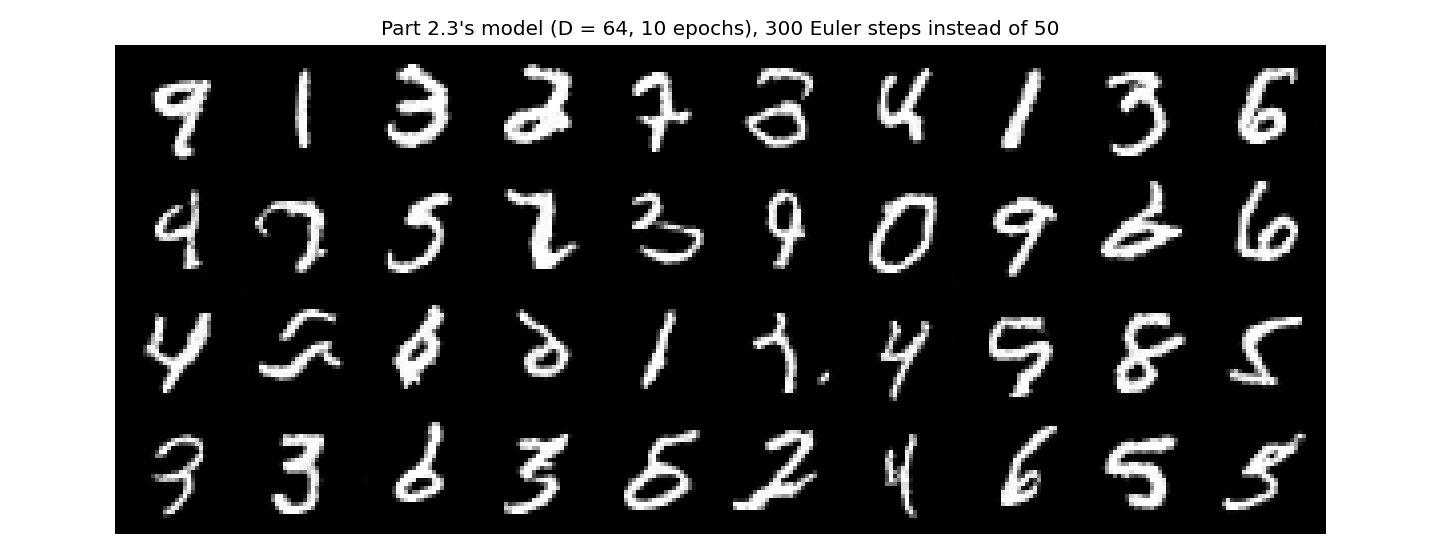
This part is optional for CS180, but I tried to make the time-only model better anyway. Nothing I tried worked, and that ended up being the interesting part. Every grid below starts from the same 40 noise images as Part 2.3.
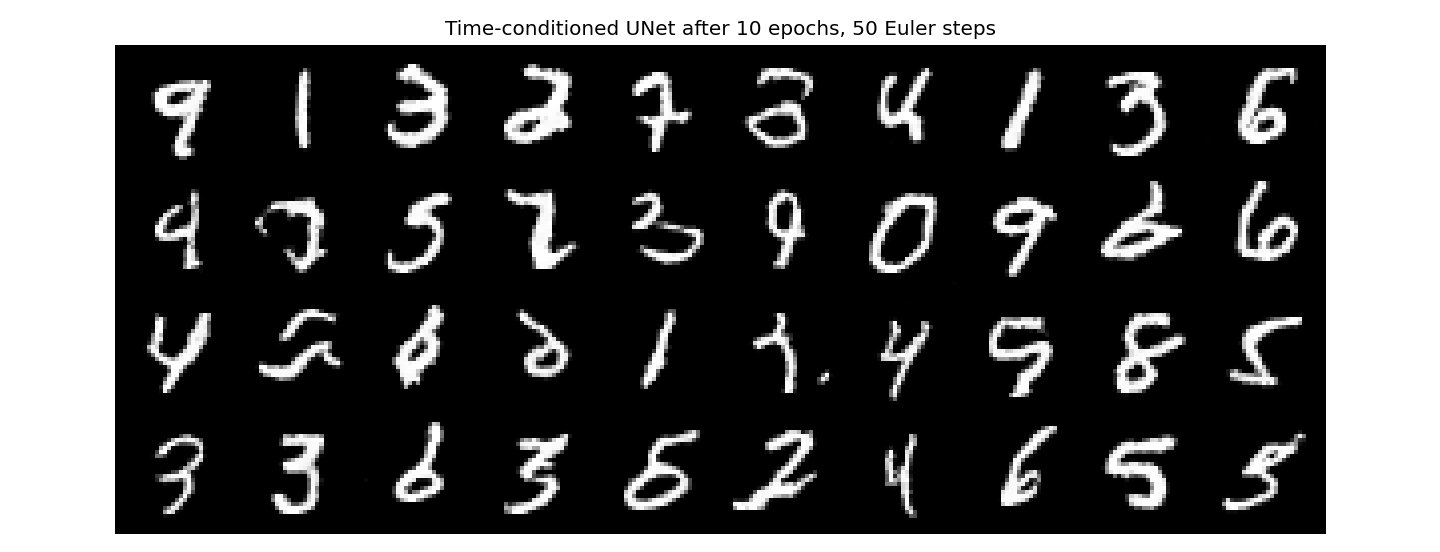
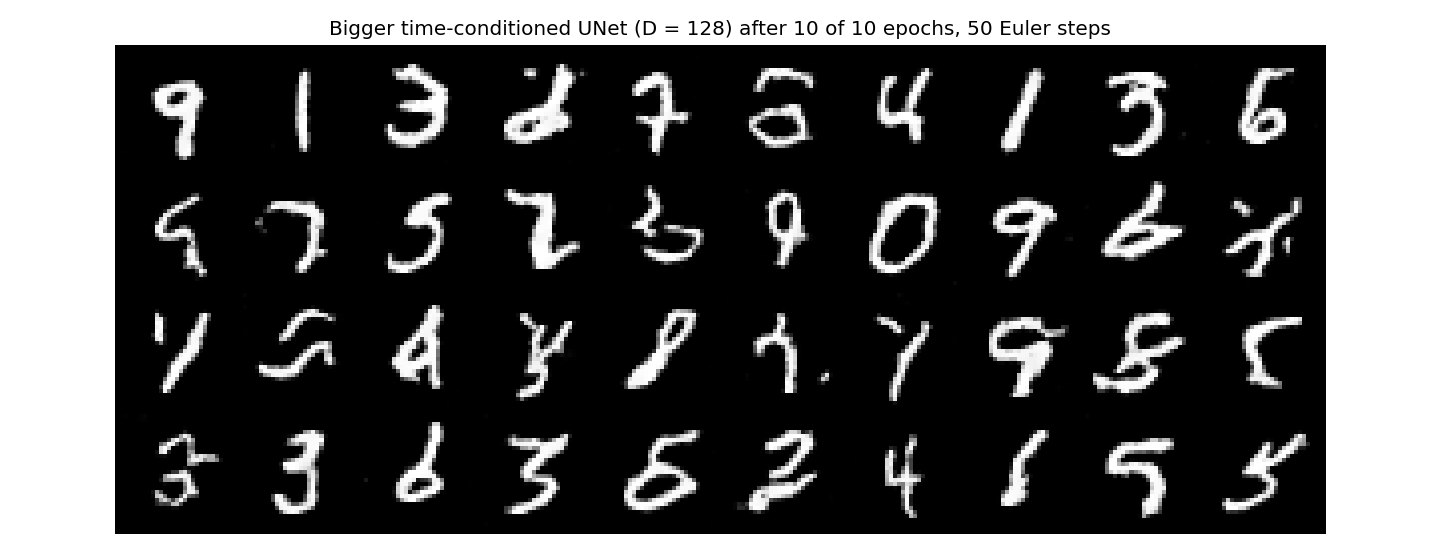
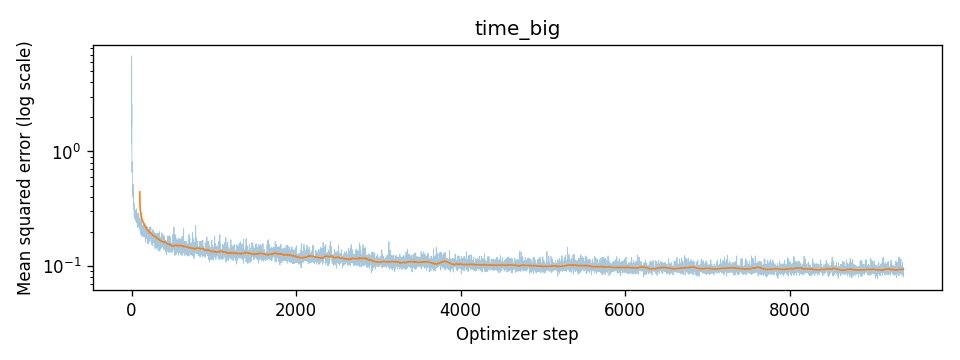
First I doubled the width to D = 128, about 8 million parameters instead of 2, and kept everything else the same: 10 epochs, the same learning rate schedule and the same seed. It finished at a loss of 0.0934, slightly worse than the original's 0.0917, and the samples look about the same, with a few more broken digits.
Second, with no retraining at all, I sampled the original model with 300 Euler steps instead of 50. The digits came out almost identical. The learned paths must already be close to straight lines, so taking smaller steps along them barely changes where they end up.
So a bigger model and a finer sampler both leave the problem in place. My guess is that without the class, the model has to work out which digit it's making from the noise alone, and when a noise image is somewhere between two digits it blends them. That's the same averaging problem as the pure-noise denoiser in 1.2.3, just much milder. The class-conditioned model never has to guess, which is why it was clean after 5 epochs. The thing I didn't have time to try is training for a lot longer.